
Every UK business website must have a privacy policy, cookie consent controls, clear trader identity details, an accessibility statement, terms and conditions, a secure HTTPS connection, and pre-contract consumer information if you sell online. These obligations come from UK GDPR and the Data Protection Act 2018, PECR, the Consumer Contracts Regulations 2013, and the Equality Act 2010. The ICO and GOV.UK are your two most important bookmarks.
Run through this quick checklist first. Tick each item or flag it as a gap to fix:
- Privacy policy published: yes / no
- Cookie banner with accept and reject options: yes / no
- Trader name, address, and contact email in footer: yes / no
- Company registration number (if limited company): yes / no
- SSL certificate active (HTTPS in browser bar): yes / no
- Accessibility statement published: yes / no
- Terms and conditions page live: yes / no
- Returns and cancellation policy visible at checkout: yes / no
- Marketing emails include an unsubscribe link: yes / no
If you ticked "no" on any of the first four, those are your highest-priority fixes. Cookie consent and the privacy notice are the most commonly cited gaps in practical compliance audits, and both can be resolved in a day or two without specialist help. SSL is non-negotiable for any site that collects data. Trader identity details cost nothing to add and protect you from enforcement action.
Key takeaways
Meeting UK website legal requirements is achievable in a focused week for most small businesses: fix cookies and privacy first, add trader identity details, confirm SSL, then work through accessibility and terms.
| Point | Details |
|---|---|
| Privacy notice is mandatory | Every site collecting personal data needs one; use the ICO generator for accuracy. |
| Cookie consent must be genuine | Your banner needs a real reject option; pre-ticked boxes and accept-only banners breach PECR. |
| Trader identity belongs in the footer | Company name, registration number, address, and contact email must be permanently visible. |
| Distance sellers face extra duties | Pre-contract information and a 14-day cancellation right are required under the Consumer Contracts Regulations 2013. |
| Ace-sites includes compliance foundations | Built-in SSL, cookie banner support, and privacy templates reduce setup time for small business owners. |
Table of Contents
- Which UK laws apply to your website?
- What trader identity and contact details must you display?
- What does your privacy notice need to cover?
- How do you handle cookies and trackers correctly?
- What do you need to show if you sell online?
- What are your accessibility obligations?
- What are the PECR rules for email marketing?
- What security basics does your site need?
- What should your terms and conditions cover?
- How long does it take to fix common compliance gaps?
- Run a 30–60 minute website legal audit right now
- How do you handle children's data on your website?
- Do you have legal obligations around website downtime?
- How do you keep your website content legally current?
- What advertising rules apply to your website?
- What most small business owners get wrong about website compliance
- Your compliant website, ready faster than you think
- Sources
Which UK laws apply to your website?
Understanding where each obligation comes from helps you prioritise and push back on anyone who tries to over-engineer your compliance. The table below maps the main statutes to their practical effect on your site.
| Law or regulation | What it requires from your website | Where to read it |
|---|---|---|
| UK GDPR / Data Protection Act 2018 | Privacy notice, lawful basis for processing, data subject rights, breach notification | ICO, GOV.UK, legislation.gov.uk |
| PECR 2003 | Cookie consent, electronic marketing rules, unsubscribe mechanisms | ICO, legislation.gov.uk |
| Electronic Commerce Regulations 2002 / Companies Act | Trader identity, contact details, company registration number | legislation.gov.uk, nibusinessinfo |
| Consumer Contracts Regulations 2013 | Pre-contract information, 14-day cancellation right, delivery terms | GOV.UK, legislation.gov.uk |
| Consumer Rights Act | Goods, services and digital content standards; refund rights | GOV.UK |
| Equality Act 2010 | Reasonable adjustments for disabled users; accessibility duties | GOV.UK, WCAG guidance |
The Electronic Commerce (EC Directive) Regulations 2002 sit alongside the Companies Act to create the trader-identity obligations. For nuanced points about how permanently and accessibly disclosures must be displayed, PracticalLaw's obligations note is worth bookmarking.
One practical tip: decide early whether your site is purely informational, service-delivery, or transactional. A transactional site triggers the Consumer Contracts Regulations on top of everything else. Mapping that distinction up front stops you either missing obligations or spending time on rules that simply do not apply to you.
What trader identity and contact details must you display?
The Electronic Commerce Regulations and Companies Act require you to make certain identity information easily and permanently available. "Permanently" means it cannot be buried in a pop-up that disappears; a footer or a dedicated Contact or About page works well.
Limited companies and LLPs must display:
- Full registered company name
- Company registration number
- Place of registration (England and Wales, Scotland, or Northern Ireland)
- Registered office address
- VAT number (if VAT-registered)
- A geographic trading address if different from the registered office
- Contact email address and at least one non-electronic contact method
Sole traders must display:
- Their own name (or trading name plus the owner's name)
- A geographic address where legal documents can be served
- Contact email and a non-electronic contact method
Put these details in your site footer so they appear on every page. A Contact page is a sensible second location. If you trade under a brand name that differs from your registered name, show both. Missing these details risks enforcement action and, more practically, erodes customer trust before a visitor even reads your services page.
Pro Tip: If you are a limited company, check that your registered office address is current at Companies House. An outdated address on your website is both a legal disclosure failure and a Companies House filing issue.
What does your privacy notice need to cover?
Every site that collects personal data needs a privacy notice and a documented lawful basis for each type of processing. That covers contact forms, analytics, newsletter sign-ups, booking widgets, and any third-party tools that drop cookies or collect IP addresses.
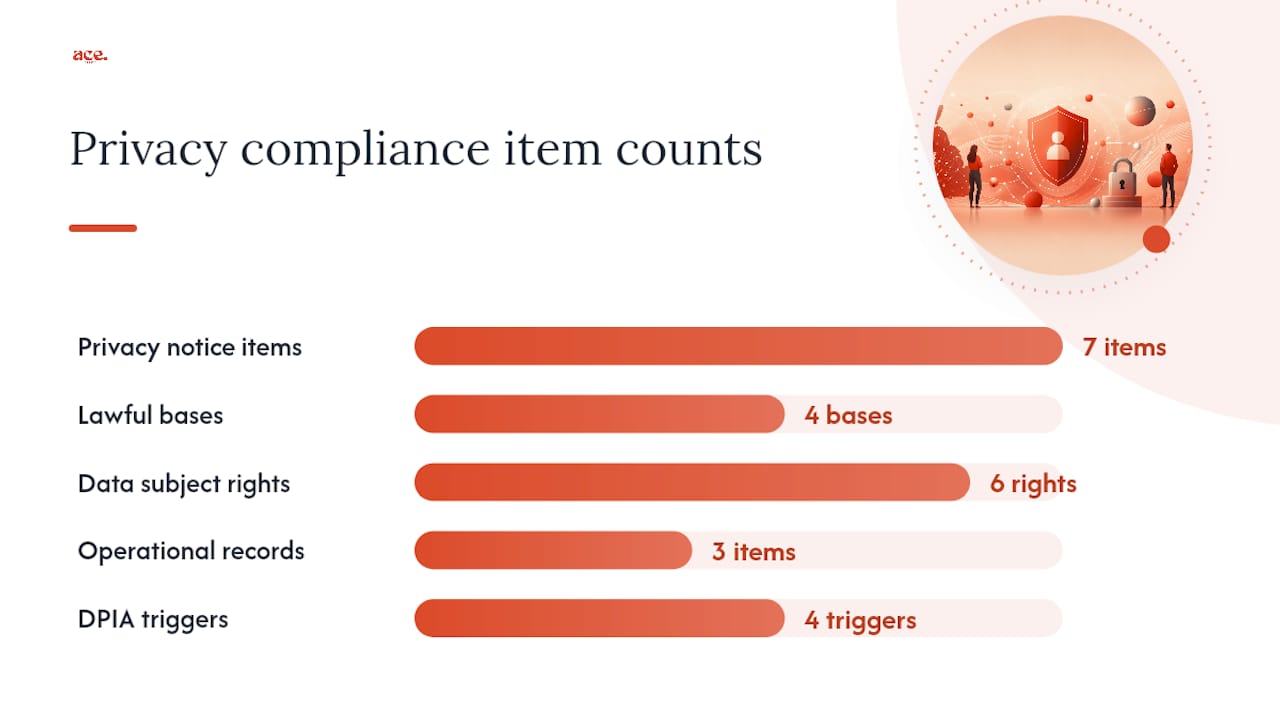
Your privacy notice must tell visitors:
- What personal data you collect and how you collect it
- Why you collect it and the lawful basis (consent, legitimate interests, contract, legal obligation)
- How long you keep it (a retention schedule, not just "as long as necessary")
- Who you share it with, including third-party processors and any international transfers
- The rights of the data subject: access, rectification, erasure, restriction, portability, and objection
- How to contact you with a data-protection query
- How to complain to the ICO if they believe their data has been mishandled
Operationally, you also need a record of processing activities (a simple spreadsheet works for most small businesses), a retention schedule, and a process for handling subject access requests within one month.
Pro Tip: The ICO explicitly recommends that small organisations use its free privacy-notice generator rather than copying a template from another site. Copied templates routinely describe processing activities that do not match your actual practices, which creates its own compliance risk.
A Data Protection Impact Assessment (DPIA) is required when processing is likely to result in high risk to individuals. Practical triggers include profiling, processing special-category data (health, biometrics, religion), large-scale monitoring, or automated decision-making. For most small business websites, a DPIA is not needed, but if you add a booking system that profiles users or a health-related intake form, run one before you go live.
How do you handle cookies and trackers correctly?
Non-essential cookies and trackers require active, informed consent before they fire. Essential cookies (session management, security, load balancing) do not. That distinction is the foundation of PECR compliance.
Follow these steps to get your cookie setup right:
- Audit your cookies. Use a scanning tool such as CookieBot or Cookieyes to generate a list of every cookie and tracker your site loads. Do this before you build your consent banner, not after.
- Categorise them. Separate strictly necessary cookies from analytics, advertising, and functional ones. Google Analytics, Meta Pixel, and retargeting scripts all require consent.
- Build a compliant banner. The banner must offer a genuine reject option alongside accept. Pre-ticked boxes are not lawful. Consent must be granular: a visitor should be able to accept analytics but reject advertising cookies.
- Store consent records. Your consent management platform (CMP) should log what was consented to, when, and under which version of your cookie policy.
- Publish a cookie policy. This is separate from your privacy notice and lists every cookie by name, purpose, and duration.
- Review quarterly. New plugins and third-party scripts introduce new cookies. A quarterly scan keeps your records accurate.
Technologies that almost always require consent: Google Analytics (unless configured in a consent-mode that avoids personal data), Facebook/Meta Pixel, LinkedIn Insight Tag, HotJar, and any retargeting or advertising pixel.
What do you need to show if you sell online?
If you sell products, services, or digital content online, the Consumer Contracts Regulations 2013 require you to give customers specific information before they place an order. Missing this information does not just create a legal risk; it can extend the customer's cancellation window substantially.
Pre-contract information you must display:
- Total price including VAT and any delivery charges
- Your identity and geographic address
- A description of the goods, services, or digital content
- Delivery arrangements and estimated timescales
- The customer's right to cancel (where it applies) and how to exercise it
- Who pays return costs
- A clear statement of any conditions that remove the cancellation right (e.g. bespoke goods, digital content once download begins)
The standard cancellation period is 14 days from delivery for goods, or 14 days from contract formation for services. If you fail to provide the required pre-contract information, that window can extend to up to 12 months and 14 days under the Regulations. GOV.UK's distance-selling guidance sets this out clearly.
Digital content has its own rules. Once a customer downloads or streams content and has confirmed they understand the cancellation right is lost on delivery, you can remove that right. Without that confirmation, the 14-day window applies. Business also flag that cross-border sales and marketplace selling carry additional VAT and regulatory considerations.
What are your accessibility obligations?
The Equality Act 2010 requires service providers to make reasonable adjustments for disabled people. For websites, that means removing barriers that prevent disabled users from accessing your content or services. WCAG 2.1 Level AA is the widely accepted practical standard for meeting that duty.
Steps to assess and improve accessibility:
- Run an automated scan using a tool such as Axe, WAVE, or Lighthouse to catch obvious failures (missing alt text, poor colour contrast, unlabelled form fields).
- Test manually with a keyboard only (no mouse) to check navigation and focus order.
- Test with a screen reader such as NVDA (Windows) or VoiceOver (Mac/iOS).
- Check that text can be resized to 200% without content breaking.
- Review forms, error messages, and interactive elements for clear labels and instructions.
What your accessibility statement must include:
| Element | What to say |
|---|---|
| Conformance level | Whether the site is fully, partially, or non-conformant with WCAG 2.1 AA |
| Known issues | A list of specific barriers and when you plan to fix them |
| Contact method | How a user can request an accessible alternative or report a problem |
| Enforcement route | Reference to the Equality and Human Rights Commission (EHRC) for complaints |
| Review date | When the statement was last updated |
Publish the accessibility statement on a clearly labelled page and link to it from your footer. For complex transactional flows or web applications, automated scans alone are not sufficient; bring in a specialist for manual testing.
Pro Tip: A mobile-friendly website and an accessible one share many of the same foundations: clear structure, readable text, and logical navigation. Fixing one often improves the other.
What are the PECR rules for email marketing?
You need consent to send marketing emails unless you can rely on the soft opt-in. The soft opt-in applies when someone has bought from you recently, you are marketing similar products or services, and you gave them a clear opportunity to opt out at the time of purchase and in every subsequent message.
Do:
- Use an unticked opt-in checkbox on sign-up forms
- State clearly what subscribers will receive and how often
- Include a working unsubscribe link in every marketing email
- Keep a record of when and how consent was given
- Honour unsubscribe requests promptly (within 10 working days is the ICO's expectation)
Do not:
- Use pre-ticked boxes for marketing consent
- Bundle marketing consent into your terms of service acceptance
- Continue sending emails after someone unsubscribes
- Assume that a business email address removes the need for consent under PECR (it does not for sole traders or partnerships)
Audit your sign-up forms at least once a year. Check that the consent language accurately describes what you send and that your CRM or email platform stores consent records with timestamps. If you cannot demonstrate when and how consent was given, you cannot rely on it.
What security basics does your site need?
HTTPS is the baseline. Any site that collects personal data, processes payments, or handles login credentials must use a valid SSL/TLS certificate. Most modern hosting platforms include one, but check that it renews automatically and that your site redirects HTTP to HTTPS without exception.
Security checklist:
- SSL/TLS certificate active and auto-renewing
- HTTP to HTTPS redirect in place
- Software, plugins, and themes kept up to date
- Strong, unique passwords and two-factor authentication on admin accounts
- Regular backups stored off-site or in a separate environment
- A Content Security Policy (CSP) header to reduce cross-site scripting risk
- No sensitive data (passwords, card numbers) stored in plain text
For payments, you do not need to be a PCI DSS expert, but you do need to use a reputable payment processor (Stripe, PayPal, Square, Worldpay) that handles card data on their own PCI-compliant infrastructure. Never store raw card numbers on your own server. If you use a hosted payment page, the processor's PCI scope covers the transaction; your obligation is to ensure the integration is not modified in ways that intercept data before it reaches the processor.
Under UK GDPR, a personal data breach that is likely to result in risk to individuals must be reported to the ICO within 72 hours of discovery. Breaches that are unlikely to result in risk still need to be documented internally. Keep a breach log even if you never need to report one; it demonstrates accountability.
What should your terms and conditions cover?
Terms and conditions are mandatory if you sell goods, services, or digital content. For informational or lead-generation sites, they are strongly recommended because they set out the rules for using your site and limit your liability.
Clauses to include:
- Who you are and how to contact you
- How a contract is formed (when the order is accepted, not just placed)
- Pricing, payment terms, and what happens if a price error occurs
- Delivery terms and risk of loss
- Returns, refunds, and cancellation rights (mirroring your Consumer Contracts Regulations obligations)
- Limitation of liability (what you are and are not responsible for)
- Intellectual property: who owns the content on the site
- Acceptable use rules if users can post content or interact with the site
- Governing law (English law for most UK businesses; Scottish law if you are based in Scotland)
For IP, assert your copyright clearly in the footer ("© 2026 [Your Business Name]. All rights reserved.") and check that any images, fonts, or code you use are properly licensed. If users can submit content (reviews, forum posts, photos), include a notice-and-takedown process so you can remove infringing material quickly. The Flat Insurance terms page is a useful example of how to structure clause layout in plain, readable language.
How long does it take to fix common compliance gaps?
Most of the quick wins take hours, not weeks. The table below gives realistic estimates for common tasks, whether you handle them yourself or bring in help.
Costs vary significantly by provider and site complexity. The figures above are illustrative ranges for small UK businesses. For anything involving high-risk data processing, automated decisions, or complex transactional flows, a data-protection solicitor or a certified DPO is worth the investment.
Run a 30–60 minute website legal audit right now
You do not need a lawyer to run a first-pass audit. Work through these 12 checks, screenshot the evidence, and note what needs fixing.
- Trader identity. Open your footer. Can you see your business name, address, and contact email? If you are a limited company, is the registration number there?
- Privacy notice. Is there a link to a privacy notice in your footer? Open it and check it names a lawful basis for each type of processing.
- Cookie banner. Clear your browser cookies and reload your site. Does a banner appear before any non-essential cookies fire? Does it offer a genuine reject option?
- SSL. Check the browser address bar. Does it show HTTPS and a padlock? Visit an HTTP version of your URL and confirm it redirects.
- Terms and conditions. Is there a T&Cs page? Does it cover contract formation, returns, and governing law?
- Returns and cancellation policy. If you sell online, is the 14-day cancellation right stated clearly before checkout?
- Accessibility statement. Search your site for "accessibility statement". Is one published? Does it list known issues and a contact method?
- Payment security. If you take payments, are you using a hosted payment page from a reputable processor? Check that your checkout URL is HTTPS throughout.
- Contact methods. Is there at least one non-electronic contact method (phone number or postal address) alongside your email?
- Marketing consent. Check your newsletter sign-up form. Is the opt-in checkbox unticked by default? Does the label describe what subscribers will receive?
- Data-flow map. List every tool on your site that collects or processes personal data (contact forms, analytics, booking widgets, live chat). Note what data each collects and where it goes.
- Content accuracy. Check that prices, service descriptions, and any regulatory claims are current and accurate. Outdated pricing on a product page creates consumer-law exposure.
Save screenshots of each check as your evidence file. If you use a publishing guide when launching or updating your site, add these audit steps to your go-live checklist.
How do you handle children's data on your website?
If your site is likely to be accessed by children under 13, the ICO's Children's Code (also called the Age Appropriate Design Code) applies. It sets 15 standards for online services, including defaulting to high privacy settings, not using nudge techniques to push children towards less private options, and not profiling children for advertising.
Age verification is not a simple checkbox. The ICO expects services to take a risk-based approach: consider who your audience is, what data you collect, and whether children are likely to use your service. If they are, you need either a credible age-assurance mechanism or design choices that protect children by default.
For most small business websites (a local plumber, a beautician, a consultant), children's data is not a primary concern. But if you run a site with user accounts, a community forum, or content aimed at younger audiences, take the Children's Code seriously. The ICO has enforcement powers and has used them.
Do you have legal obligations around website downtime?
There is no UK law that requires a specific uptime percentage for most small business websites. However, several indirect obligations apply. If your site is part of a service contract with customers (for example, a SaaS product or a subscription service), your terms of service and the Consumer Rights Act create expectations around service quality and continuity.
For e-commerce sites, extended downtime during which customers cannot exercise cancellation rights or access order information could create a consumer-law issue. Keep a basic incident log. If your site goes down for more than a few hours, consider a status page or a brief notice on social media so customers know what is happening.
Your hosting contract will typically include a service level agreement (SLA) with an uptime commitment. Check it. If your provider fails to meet it, you may have a contractual remedy.
How do you keep your website content legally current?
Outdated content creates real legal risk. A price that changed three months ago but still appears on your site is a consumer-law problem. A service description that no longer matches what you deliver could be misleading under the Consumer Protection from Unfair Trading Regulations 2008.
Set a quarterly content review in your calendar. Check:
- Prices and VAT treatment are current
- Service descriptions match what you actually offer
- Any regulatory claims (qualifications, accreditations, insurance) are still accurate
- Legal pages (privacy notice, T&Cs, cookie policy) reflect your current practices
- Any statistics or third-party data you cite are still accurate
Disclaimers are useful but not a substitute for accurate content. A disclaimer saying "information is correct at time of publication" does not protect you if you knowingly leave inaccurate pricing live. Use disclaimers for genuinely uncertain information (market conditions, regulatory changes pending) rather than as a cover for content you have not updated.
What advertising rules apply to your website?
The Advertising Standards Authority (ASA) applies the UK Code of Non-broadcast Advertising (CAP Code) to advertising and marketing communications on websites, including banner ads, paid social content, and promotional copy. The ASA can require you to remove or amend misleading claims, and persistent non-compliance can result in referral to Trading Standards.
Key rules:
- Advertisements must be obviously identifiable as ads. If you publish sponsored content or affiliate links, label them clearly ("Advertisement", "Paid partnership", or "Affiliate link").
- Claims must be substantiated. If you say your product is "the UK's best" or "clinically proven", you need evidence to back it up.
- Pricing claims must be accurate. "Was £99, now £49" requires that the higher price was genuinely charged for a meaningful period.
- Testimonials and reviews must be genuine. Fake reviews or selectively edited testimonials breach both the CAP Code and the Consumer Protection from Unfair Trading Regulations.
The Competition and Markets Authority (CMA) also has enforcement powers over misleading online practices, including fake urgency tactics ("only 2 left!" when stock is plentiful) and subscription traps. Keep your promotional copy honest and your claims evidenced.
What most small business owners get wrong about website compliance
Most of the compliance failures I see on small business websites are not deliberate. They are the result of copying a template privacy policy from another site, installing a cookie banner that only has an "Accept" button, and forgetting to add the company registration number to the footer.
The cookie banner issue is the one that surprises people most. A banner that only lets visitors accept cookies is not compliant. PECR requires a genuine choice. If your banner has no reject option, or if the reject option is buried or styled to discourage use, you are not meeting the standard. Fix this before anything else; it is the most visible compliance gap and the one regulators notice first.
The second most common error is the copied privacy policy. A policy that describes data practices you do not actually follow is arguably worse than no policy at all, because it actively misleads visitors. Use the ICO's generator, answer its questions honestly, and you will have a policy that reflects your real practices.
Quick wins that deliver most of the benefit: fix the cookie banner, enable HTTPS if it is not already active, publish a privacy notice using the ICO generator, and add your trader details to the footer. Those four steps address the majority of the risk for most small business websites. Everything else is important, but those four are where to start.
Your compliant website, ready faster than you think
Getting your website legally right does not have to mean months of back-and-forth with solicitors. Ace-sites builds professional websites for UK small businesses that come with SSL included as standard, a cookie banner built in, and a privacy policy template you can customise to your actual practices in minutes.

If you would rather hand the whole thing over, the done-for-you service handles the build, the technical setup, and the compliance foundations for you. You review it before you pay a penny. For owners who want to manage their own site, the platform features include easy page editing, built-in SEO tools, and mobile-optimised templates that make keeping your content current straightforward. Start your free trial and see your site before you commit.
Sources
Use these official pages to verify details, download templates, and stay current with regulatory changes.
For privacy and cookies:
- Cookies and privacy notices in detail | ICO
- The UK's data protection legislation
- Legislation
- Legislation
- Legislation
- Nibusinessinfo
- UK website compliance checklist (2026) — Webinetics
- Information provision obligations on UK website operators
For primary legislation:
For e-commerce and consumer rights:
For practical checklists and business guidance:
This article provides general information about UK website legal requirements and is not a substitute for professional legal or data-protection advice. Verify current rules with the ICO, GOV.UK, or a qualified solicitor before making compliance decisions for your business.