
Most UK small businesses should budget between £29 and £150 a month for proper website maintenance, with e-commerce and revenue-critical sites often running £150 to £600+. For the average local business site, an entry or a standard managed plan covers you properly. Anything under £30 a month is usually automation only, with no human checking the work.
TL;DR:
- Smaller, local business sites typically need a maintenance plan costing between £29 and £99 per month, with higher costs reserved for e-commerce and critical sites.
- Key factors that increase costs include custom code, third-party integrations, high traffic, and fast response demands, which often double or triple monthly fees.
- Essential plan inclusions should cover off-site backups, human-reviewed updates, uptime monitoring, and security scanning, with staging and restore testing as valuable extras.
- DIY maintenance may seem cheaper but often results in significant time and risk costs, especially considering the potential sales loss from site downtime.
- For most small businesses, choosing a straightforward, entry-level managed plan that includes backups, security, and updates is sufficient, avoiding expensive enterprise solutions unless necessary.
Table of Contents
- Website maintenance cost UK: the typical monthly bands
- What does website maintenance actually include?
- What pushes your website maintenance cost up?
- DIY versus paying for maintenance: what your time is actually worth
- How to choose a maintenance plan without getting stung
- Where aceSites fits for small businesses on a budget
- Does website maintenance cost more in London than elsewhere in the UK?
- Contract terms and how maintenance plans are usually billed
- In-house versus outsourced: which actually costs less?
- Author perspective: what I'd actually recommend
- Getting started with a managed website that includes the basics
- Sources
Website maintenance cost UK: the typical monthly bands
Knowing where your site sits on the price ladder stops you overpaying or, worse, underpaying for a plan that leaves you exposed. UK maintenance pricing splits into four rough bands, and each one buys you a genuinely different level of care.
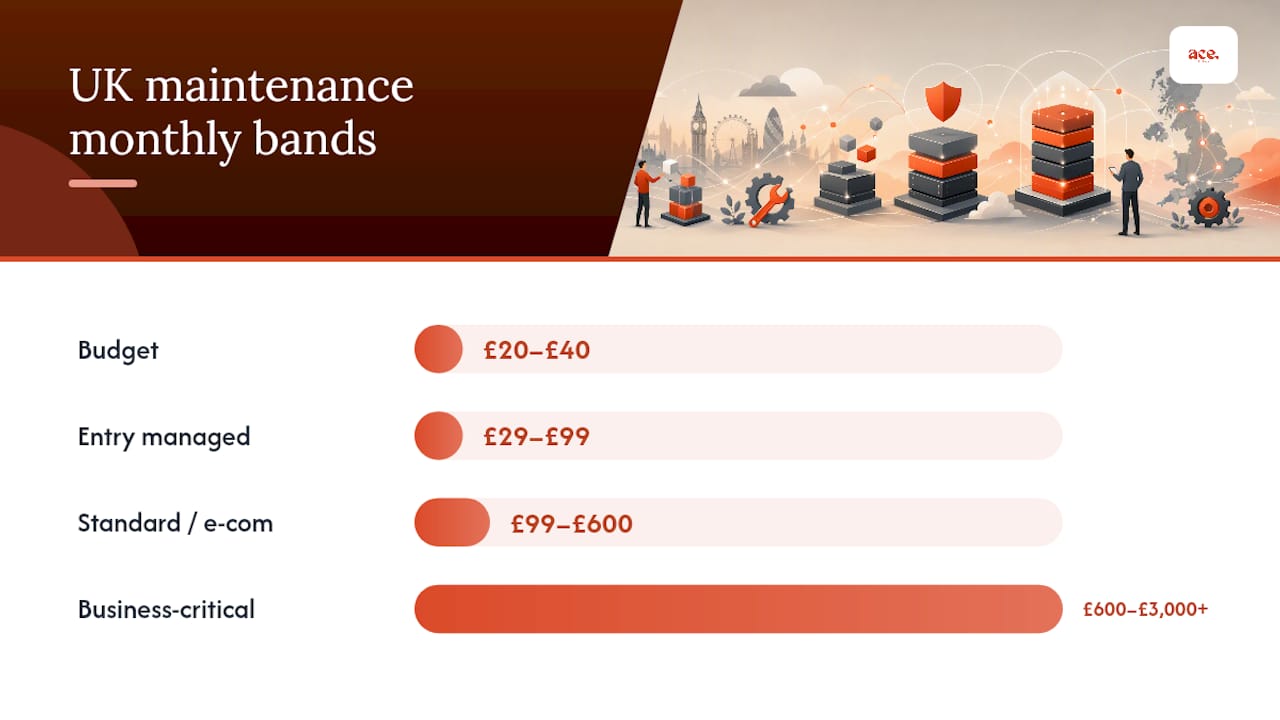
Budget (£20–£40/month) covers automated backups, a basic security scan, and perhaps a core update. There's usually no human reviewing what the automation does, which matters more than it sounds. A local trades brochure site with five static pages sits comfortably here, provided nobody's editing content weekly.
Entry managed (£29–£99/month) is where most small businesses land. You get hosting bundled or clearly costed separately, off-site backups, plugin and core updates applied by a person, and someone to call when something breaks. A lead-generation site for a services business, say a small accountancy firm or a physiotherapy clinic, typically fits this band.
Standard/e-commerce (£99–£600/month) brings staging environments, restore-tested backups, and faster response windows. A small WooCommerce shop shifting a few hundred orders a month belongs here, not in the budget tier, because a broken checkout costs far more than the plan itself.
Business-critical (£600–£3,000+/month) is for stores or platforms where an hour of downtime genuinely hurts turnover. This band includes proactive monitoring around the clock and short guaranteed restore times. WebPulseLab's pricing analysis puts enterprise and high-availability setups firmly in this range.
Move up a band when any of these apply:
- You take payments directly through the site
- Downtime would stop customers reaching you at all
- You're editing content or products weekly, not monthly
- A previous outage cost you real bookings or sales
One presentation note worth flagging: most UK agencies quote maintenance fees excluding VAT, so always check whether the number in front of you is the number you'll actually pay.
What does website maintenance actually include?
Quotes vary wildly partly because "maintenance" means different things to different providers. Before comparing prices, compare what's actually in the box.
Core inclusions you should expect as standard:
- Hosting — either bundled into the fee or itemised separately; ask which, because "hosting excluded" quietly adds £10–£30 a month
- SSL certificate management and renewal
- Backups stored off-site, with a stated retention period (30 days minimum is reasonable)
- Security scanning on a regular schedule, not just when something looks wrong
- CMS and plugin updates applied and checked, not just triggered automatically
- Uptime monitoring with some form of alert if the site goes down
Value-added items that separate a good plan from a basic one:
- A staging site to test updates before they touch the live version
- Restore-tested backups, meaning someone has actually confirmed a backup can be recovered, not just that one exists
- Performance monitoring to catch a slowing site before customers notice
- Small content edits included in the fee rather than billed separately
- Monthly reporting and a named contact who knows your site's history
Common exclusions catch people out: plugin licence renewals, premium theme fees, and bespoke development work almost never sit inside a base maintenance fee. Security scanning matters more than most owners assume. Sucuri's threat reporting shows attacks against small business sites are routine, not rare, which is why patching promptly earns its place on every checklist rather than being an optional extra.
Pro Tip: Ask for the exclusions list before the inclusions list. A provider who can rattle off what's NOT covered usually has a tighter, more honest scope than one who only talks about what you get.
What pushes your website maintenance cost up?
Two businesses with near-identical websites can pay wildly different maintenance fees, and the gap almost always comes down to a handful of specific factors rather than the provider simply charging more.
Platform choice sets the baseline. WordPress sites need more frequent plugin and core updates than hosted platforms like Shopify, and plugin licence costs add up separately from the maintenance fee itself. A site running fifteen plugins is a bigger job than one running four, and a sensible provider will price accordingly.
Beyond the platform itself, several factors compound quickly:
- Custom code means someone has to understand your specific build before touching it, not just run standard update routines
- Third-party integrations (CRM, ERP, booking systems) multiply the things that can break when one part updates
- Traffic volume pushes up hosting and monitoring demands even before you add e-commerce
- Response time demands cost more; a same-day fix guarantee needs staff on standby in a way a 48-hour window doesn't
- Testing and staging requirements add time to every single update cycle
- Seasonal peaks (retail's Black Friday, a tax firm's January rush) need capacity planning that a flat quiet-year site never requires
The general pattern holds: the more moving parts your site has, and the faster you need problems fixed, the higher the monthly fee climbs. A five-page brochure site with no integrations is a fundamentally different job from a WordPress store pulling stock data from a warehouse system.
DIY versus paying for maintenance: what your time is actually worth
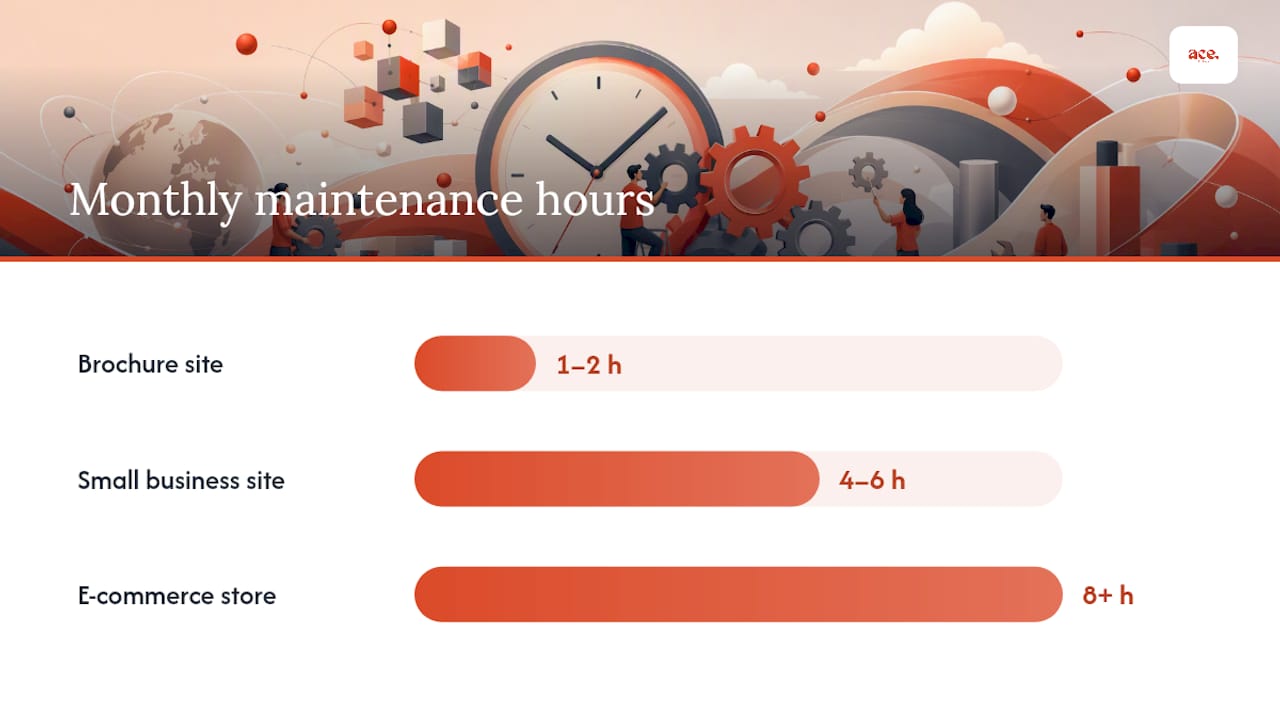
Doing it yourself looks free right up until you count the hours. A brochure site typically needs an hour or two a month of genuine attention. A small business site with regular content changes needs closer to four to six hours. An e-commerce store, especially one with stock and pricing changes, can eat eight hours or more once you include the fixes that inevitably crop up.
Run that against what your time is worth as a business owner, not what a junior employee costs, and DIY stops looking free fast.
- Work out your effective hourly rate as an owner or manager, then multiply by monthly maintenance hours
- Compare that figure to a managed plan in the relevant band, not to the cheapest freelancer you can find
- Add the risk cost of getting it wrong, since a botched update on a live site can mean hours of downtime while you figure out what broke
UK freelancer day rates for website work commonly run from £150 to £400+ depending on experience, and Nine Stones's market analysis notes that retainer arrangements typically work out cheaper per hour than ad-hoc callouts, because the provider isn't pricing in the uncertainty of one-off work.
The real risk isn't the hourly maths, though. It's what happens when DIY goes wrong. OrderWise's downtime analysis shows that for e-commerce sites, a single outage can cost more in lost sales than a year of proper maintenance fees. That's the number that should actually drive the decision, not the monthly line item on its own.
How to choose a maintenance plan without getting stung
Comparing quotes properly means asking the same questions of every provider, because vague scope is where hidden costs hide.
Run through this checklist before signing anything:
- Does the plan include a staging environment for testing updates?
- Are backups actually restore-tested, or just created and left untouched?
- How many hours of content changes are included each month?
- Do you get monthly reporting and a named contact, or a generic support inbox?
- What's the stated response time for a broken site, and is it written down anywhere?
Ask providers directly:
- What exactly is excluded from this price?
- How long does a full site restore actually take, in practice?
- Who applies updates, a person or a script?
- What's the escalation process if the first fix doesn't work?
Red flags worth walking away from: a scope description too vague to compare against another quote, "automatic updates" with no mention of testing, hosting excluded from the price without a clear cost attached, and no service level commitment of any kind.
| Signal | Good sign | Red flag |
|---|---|---|
| Backups | Tested restores, stated retention | "We take backups" with no detail |
| Updates | Human-reviewed after automation | Fully automatic, no testing |
| Response time | Written SLA with hours stated | "We'll get to it" |
| Scope | Itemised inclusions and exclusions | One vague paragraph |
| Contact | Named person, direct line | Generic support ticket only |
For e-commerce businesses doing meaningful revenue, WebPulseLab's pricing guide suggests budgeting roughly 3 to 6% of online revenue for platform, hosting and technical maintenance combined. It's a useful sanity check if a quote feels either suspiciously cheap or steep.
Where aceSites fits for small businesses on a budget
For service businesses that don't need a bespoke build or a large integration stack, a managed platform like aceSites covers most of the entry-band checklist as standard, without the separate hosting bill or plugin licence sprawl that WordPress sites accumulate.
Built-in features that matter for ongoing cost:
- Hosting and SSL included, so there's no separate line item to chase
- Built-in SEO tools and a blog manager, so content updates don't need a developer
- No hidden fees, with rapid deployment if you're launching from scratch
It suits beauticians, tradespeople, consultants, and local service providers who want a straightforward site without agency overheads. Businesses running complex integrations, high-volume e-commerce, or bespoke functionality will still outgrow a platform like this and need a dedicated retainer or agency relationship instead. For most local service businesses, though, it removes several cost variables in one move.
Does website maintenance cost more in London than elsewhere in the UK?
Yes, broadly. Agencies and freelancers based in London and the South East tend to quote higher day rates than those in the Midlands, the North, or Scotland, simply because their own overheads (office space, salaries, living costs) run higher.
That regional gap matters less than it used to, though, because most maintenance work happens remotely. A business in Bristol has no particular reason to hire locally when a provider in Newcastle can monitor uptime, apply updates, and handle backups just as effectively from a different postcode. The regional premium tends to survive only where a business specifically wants face-to-face meetings or local reputation, which is increasingly rare for routine technical work.
Where location does still matter is provider density. London and the major cities have far more agencies competing for the same clients, which can push prices down through competition even as individual overheads push them up. Rural areas with fewer local providers sometimes see slightly higher quotes simply because there's less competitive pressure, though the rise of remote-first providers and platform-based options has narrowed that gap considerably.
The practical takeaway: don't assume you need to hire locally to get a fair price, and don't assume a London quote reflects better quality rather than higher rent.
Contract terms and how maintenance plans are usually billed
Most UK website maintenance agreements run on a rolling monthly basis rather than locking you into a long fixed term. This is worth checking specifically, because some agencies still default to 12-month contracts with an early exit penalty, which suits their cash flow more than it suits yours.
Monthly billing, paid by direct debit or card, is now the norm for entry and standard-band plans. It gives you the flexibility to leave if the service doesn't deliver, and it means your costs are predictable rather than front-loaded. Annual contracts do still appear, usually with a discount of 10 to 15% for paying upfront, and can make sense once you're confident in a provider after a few months of monthly billing.
E-commerce and business-critical plans sometimes require a minimum term, often three or six months, because the provider needs to invest setup time (staging environments, monitoring configuration, integration testing) that isn't worth doing for a client who might leave after four weeks. That's a reasonable trade-off provided the minimum term is stated clearly upfront rather than buried in a contract you signed without reading closely.
Whatever term you agree, get the notice period in writing. A 30-day notice period is standard and fair; anything longer without a good reason is worth questioning before you sign.
In-house versus outsourced: which actually costs less?
Hiring in-house for website maintenance rarely makes financial sense below a certain size, and most UK small businesses never reach that threshold. A part-time in-house web person, even at the lower end of the market, costs considerably more per month in salary and overheads than an outsourced managed plan covering the same scope of work.
The maths only starts favouring in-house once a business needs someone actively working on the site most days, typically because it's running frequent promotions, managing a large product catalogue, or building new features constantly. At that scale, dedicated staff start to justify their cost because the volume of work fills their time properly.
For the vast majority of small businesses, outsourcing wins on a simple basis: you're not paying for capacity you don't use. A managed plan charges for the actual work of backups, updates, and monitoring, scaled to your site's size. An in-house hire costs the same whether your site needs two hours of attention that month or twenty.
There's also a resilience argument outsourcing has over solo in-house staffing. A single in-house person going on holiday or leaving the business creates a gap in cover that a managed provider, backed by a team, doesn't have. That continuity is easy to overlook when comparing headline costs, but it's often the more expensive problem when it actually happens.
Author perspective: what I'd actually recommend
Most UK small businesses are overthinking this decision. Pick an entry or standard managed plan, confirm backups are restore-tested, and move on with running your business. Only step up to a higher band once you're taking payments directly or a single hour of downtime would genuinely cost you customers. The businesses that overpay are usually the ones buying enterprise-level cover for a five-page brochure site out of anxiety rather than need. For more on getting the build itself right before maintenance even enters the picture, see our guide to website design costs.
— Gabbi
Getting started with a managed website that includes the basics
If the checklist above left you totting up plugin licences, hosting bills, and separate SSL renewals, there's a simpler route informed by content optimisation for AI search that can improve ongoing maintenance and visibility. aceSites is the alternative to piecing together maintenance from multiple vendors: hosting, SSL, backups, SEO tools, and a blog manager come built into one platform, so there's no separate invoice to chase for the basics every site needs.

For service businesses, that means going live in under a day rather than waiting on quotes from three different agencies for hosting, security, and content updates separately. You can build and customise a site yourself with the AI website builder, or if you'd rather hand the whole thing over, the done-for-you service lets you see the finished site before paying anything. Either route removes the maintenance guesswork this article has walked through, because the essentials are already part of the platform rather than a separate line item to negotiate. Start with a free build and see what your site looks like before committing to anything.