
Verify your profile, fix your NAP (name, address, phone), choose the right primary category, add photos, start asking for reviews, and enable booking or messaging where you can. Do those six things and you will have done more than most of your local competitors. According to The Search Sherpa's optimisation checklist, profile changes often take days to weeks to appear, with ranking improvements typically becoming visible within a few weeks — so the sooner you start, the sooner you see results.
Do in the next hour:
- Claim and verify your profile at Google Business Profile
- Check your business name matches your real-world signage exactly
- Confirm your address or service area is correct
- Add your primary phone number and website URL
- Choose your primary category (the single most accurate one)
- Upload multiple photos including exterior, interior, team, or work images
Do in the next week:
- Complete all remaining fields: hours, special hours, attributes, services
- Add secondary categories (up to nine, only where genuinely relevant)
- Set up a simple review request process
- Publish your first Google Post
- Enable messaging or booking links if your business supports them
Ongoing weekly tasks:
- Reply to every new review within 48 hours
- Publish a post every 7–14 days
- Check and answer any new Q&A questions
- Monitor GBP Insights for calls, clicks and direction requests
Key takeaways
A fully completed, actively maintained Google Business Profile — with accurate NAP, the right primary category, consistent reviews and regular posts — is the foundation of local search visibility for UK small businesses.
| Point | Details |
|---|---|
| Verify and complete first | Claim your profile, verify it, and fill every field before anything else — incomplete profiles rank poorly. |
| Primary category is critical | Choose the most specific accurate category; it is the single highest-impact setting in your profile. |
| Reviews need a system | Ask at every job completion, reply within 48 hours, and never incentivise reviews — velocity and recency both matter. |
| Post every 7–14 days | Regular posts signal an active profile and give Google fresh content to associate with your listing. |
| Align your website | Match your NAP, add LocalBusiness schema, and link GBP to a dedicated service or landing page — Ace-sites makes this fast to set up. |
Table of Contents
- How do you claim and verify your Google Business Profile in the UK?
- What business information should you keep accurate on your profile?
- How do you choose categories, services and products for your profile?
- What photos and videos should you add to your profile?
- How do you collect reviews ethically and reply to them well?
- How do Google Posts, offers and Q&A keep your profile working for you?
- Enable bookings, messaging and direct conversions from your profile
- What GBP Insights metrics should you track each week?
- How do relevance, distance and prominence actually affect your local ranking?
- How do you avoid a Google Business Profile suspension?
- How does your website strengthen your Google Business Profile signals?
- What actually moves the needle for UK small businesses?
- Your Google-friendly business website, built fast with Ace-sites
- Sources
How do you claim and verify your Google Business Profile in the UK?
Claim your profile first. Go to Google Business Profile and search for your business. If it already exists, request ownership. If it does not, create it from scratch. Either way, you need to be signed in with the Google Account you want as the primary owner — not a manager account, not a shared login.
Verification unlocks the full profile and tells Google the business is real. The methods available in the UK are:
- Postcard: Google mails a card with a PIN to your business address. Allow up to five working days. Keep the profile live and do not change the address while you wait.
- Phone or email: Available for some business types. Google calls or emails a PIN you enter in the dashboard.
- Instant verification: Available if your business website is already verified in Google Search Console with the same Google Account.
- Video verification: Google may ask you to record a short video showing your business location, signage and equipment. Follow the on-screen prompts carefully.
- Bulk verification: For businesses with ten or more locations, apply through the bulk verification form in Business Profile Manager. Useful for franchises and multi-site retailers.
On ownership, keep one primary owner account and add any team members as managers with appropriate access levels. If you ever lose access to the primary account, recovery becomes slow and painful. Store the login credentials securely and link the account to a business email address you control long-term.
Pro Tip: If you are waiting for a postcard, do not edit the address field. Any change resets the verification clock. Plan postcard verification before you launch any marketing that drives traffic to the profile.
For a full step-by-step walkthrough tailored to UK businesses, the Google Business Profile setup guide covers each verification method in detail.
What business information should you keep accurate on your profile?
A complete and accurate Business Profile increases the likelihood of appearing in local search and makes it easier for customers to find and contact you. The direct action: make your NAP identical everywhere, then fill every relevant field.
Critical fields to complete:
- Business name: Use your real-world trading name exactly as it appears on your signage. No extra keywords, no location tags, no descriptors that are not part of your legal or trading name.
- Address or service area: If customers visit your premises, add the address. If you travel to customers (plumbers, cleaners, mobile services), hide the address and set a service area instead. You can define multiple service areas by postcode, town or county.
- Phone number: Use your primary local number. If you use a call-tracking number, add it as the primary and your geographic number as the secondary. Avoid using only a mobile number if a landline exists.
- Website URL: Link to your homepage or, better, a dedicated landing page for the service or location. Use a canonical URL (no trailing slashes or UTM parameters in the GBP field itself).
- Opening hours: Set accurate hours and update them for bank holidays and seasonal closures using the Special Hours feature. Incorrect hours are one of the most common causes of negative reviews.
- Attributes: Tick every attribute that genuinely applies: Wi-Fi, wheelchair access, outdoor seating, women-led, LGBTQ+ friendly, and so on. These appear in filtered searches and help customers decide quickly.
NAP consistency matters beyond the profile itself. Your business name, address and phone number should be formatted identically on your website, in local directories (Yell, Thomson Local, Bing Places), and in any press coverage. Semrush's Google My Business guide highlights NAP consistency as a critical legitimacy signal that reduces visibility problems when it drifts across sources.
Pro Tip: If you use a call-tracking number, add it as the primary number in GBP but keep your geographic number visible on your website's contact page. This preserves local signals while still letting you measure call volume.
How do you choose categories, services and products for your profile?
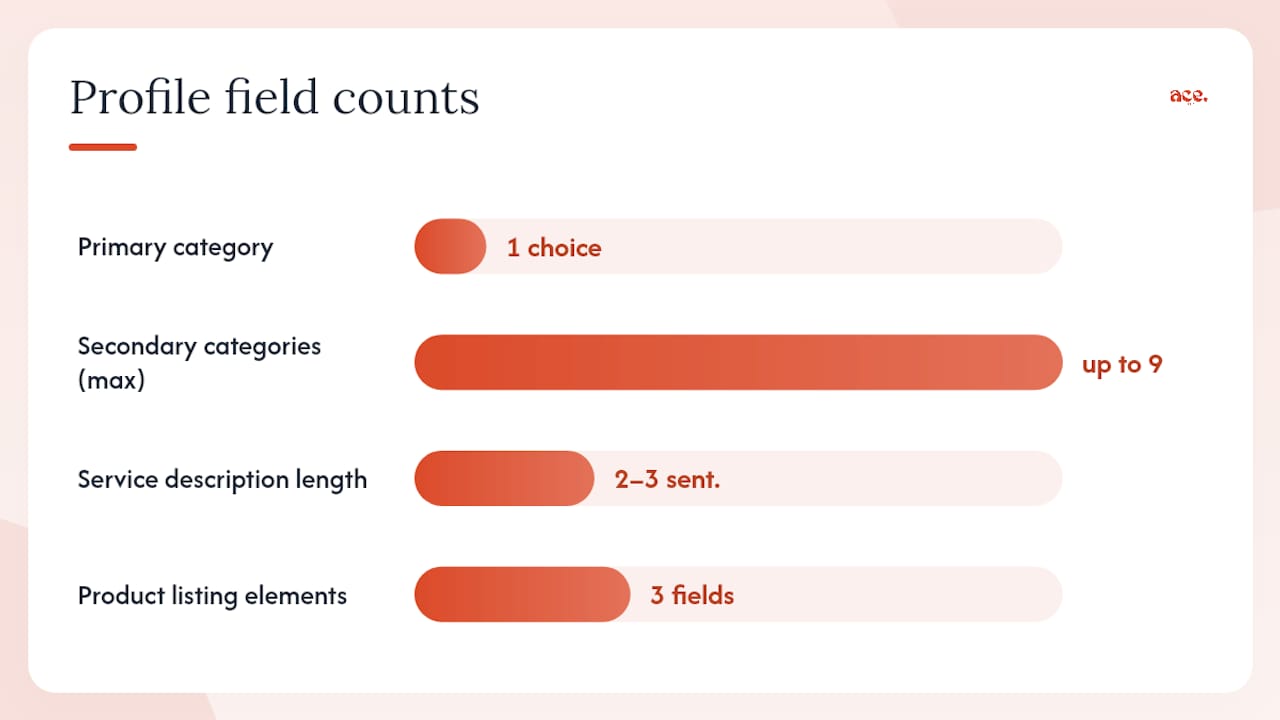
Your primary category is the single most important setting in your entire profile. It tells Google what your business fundamentally is. Choose the most accurate option available, not the broadest or the one with the most search volume. A plumber should select "Plumber", not "Home Services" or "Contractor".
Secondary categories (up to nine) let you signal additional services. A plumber who also does bathroom fitting might add "Bathroom Remodeler". A solicitor covering family and property law might add both. The rule: only add a category if you genuinely offer that service. Padding with loosely related categories does not help and can confuse Google about what you actually do.
How to populate the Services section:
- Add each service by name (e.g. "Boiler Repair", "Emergency Callout", "Power Flushing")
- Write a short description for each (two to three sentences covering what it is, who it suits and any key detail)
- Add pricing where you can — even a "from £X" figure helps customers self-qualify
For retail businesses, the Products section lets you list in-store items with photos, prices and a link to buy or enquire. In the UK, this is particularly useful for independent shops where customers search for specific items before visiting. Products appear in the profile panel and in some Shopping results.
Examples of good category-to-service mapping:
- Electrician → Services: Consumer Unit Replacement, EV Charger Installation, Landlord Safety Certificates
- Accountant → Services: Self-Assessment Tax Returns, VAT Registration, Payroll Management
- Beauty salon → Services: Gel Manicure, Lash Extensions, Brow Lamination
Pro Tip: Search Google for your top competitor in your area. Look at their primary category and services. If they rank above you and their category is more specific than yours, that is worth testing.
What photos and videos should you add to your profile?
Add high-quality exterior, interior, team and work photos from day one, then refresh them regularly. Profiles with photos receive more direction requests and website clicks than those without, and Google's own guidance confirms that photo quantity and quality contribute to prominence.
Photo types to include:
- Exterior: Your shopfront, signage or vehicle livery — taken in good daylight
- Interior: Your workspace, reception or treatment room
- Team: Real staff photos, not stock images
- Work or products: Completed jobs, dishes, products on shelves, before-and-after shots
- Logo and cover photo: Set these in the profile settings; they appear prominently in search results
Aim for at least ten photos at launch. Add two to four new images per month to show the profile is active. Google accepts JPG and PNG files; keep images above 720 x 720 pixels and under 75 MB. Short videos (up to 30 seconds, under 75 MB) work well for trades businesses showing a completed project or a salon showing its environment.
Avoid stock photography. Google can detect it and customers distrust it. Name your files descriptively before uploading (e.g. london-plumber-boiler-installation.jpg) since some evidence suggests filenames carry a small relevance signal, though this is not confirmed by Google officially.
Pro Tip: Ask customers to upload their own photos after a visit or job completion. Customer-uploaded images appear separately in your profile and add social proof that your own uploads cannot replicate.
How do you collect reviews ethically and reply to them well?
Set up a simple review workflow: ask at the point of sale or job completion, send a direct review link, and follow up once if you hear nothing. That is the whole system. The QuickSprout analysis of GBP optimisation confirms that active review management and human replies both strengthen trust and conversion.
Ways to gather reviews in the UK:
- Print a QR code linking to your review page on receipts, business cards or a small counter card
- Send a text or email with the direct link within 24 hours of completing a job
- Add a "Leave us a review" button to your website's contact or thank-you page
- Mention it verbally at the end of a positive interaction
Do not offer incentives (discounts, freebies) in exchange for reviews. This breaches Google's policies and the UK's Consumer Protection from Unfair Trading Regulations 2008, which prohibit fake or incentivised testimonials. Ask honestly and let the quality of your work do the work.
Reply templates:
Positive review: Neutral review (three to four stars): Negative review: Reply to every review, positive or negative, within 48 hours. Review velocity (how often new reviews arrive), recency and the presence of owner responses all contribute to prominence in local results. For more on building a review system, the guide to getting more customer reviews covers practical workflows in detail.
Pro Tip: Create a short URL for your review page using Google's own "Ask for reviews" link generator in the GBP dashboard. It goes directly to the review box — no hunting required.
How do Google Posts, offers and Q&A keep your profile working for you?
Publish a post every 7–14 days. That cadence keeps your profile visibly active and gives Google fresh content to associate with your listing.
Post types and when to use them:
- Update: Share news, seasonal tips or a recent project. Good for service businesses between promotions.
- Offer: Add a discount code or limited-time deal with a start and end date. Appears with a special badge in results.
- Event: Promote a workshop, open day or sale. Includes date, time and a booking link.
- Product: Highlight a specific item or service with a photo and price.
Posts expire after seven days (except Events, which run to the end date), so a fortnightly rhythm keeps something live at all times.
Managing Q&A proactively:
Seed your own Q&A section by asking and answering the questions customers most commonly ask you. Log out of your business account, search for your business, and submit the question as a member of the public. Then log back in and answer it as the owner. Keep answers short and factual.
Example Q&A pair for a heating engineer:
- Q: Do you cover emergency boiler repairs on weekends?
- A: Yes, we offer emergency callouts seven days a week across [area]. Call [number] for same-day availability.
Monitor Q&A weekly. Anyone can answer your questions, including competitors or misinformed members of the public. Flag incorrect answers and post the correct one promptly.
Pro Tip: *Write your offer posts with a clear expiry date, even if the offer is ongoing.
Enable bookings, messaging and direct conversions from your profile
Enable a booking or appointment link if your business takes bookings. This is one of the fastest ways to convert a profile view into a paying customer, and Google's Business Profile portal lists bookings, product listings and direct calls as the core conversion features available on the profile.
Booking setup checklist:
- Go to your GBP dashboard and select "Bookings"
- Connect a supported booking partner (examples include Fresha for salons, Booksy for beauty, and Setmore or Calendly for general service businesses)
- Alternatively, add a direct URL to your own booking page in the "Appointment URL" field under Business Information
- Test the link from a mobile device before publishing
Messaging options:
- GBP direct messages: Enable in the dashboard. Customers can message you from Search and Maps. Set a welcome message and aim to reply within the hour — Google displays your average response time publicly.
- WhatsApp: You can link a WhatsApp Business number to your profile in some account configurations. This suits trades and service businesses where customers prefer a quick chat before booking.
Conversion readiness checklist:
- Booking page loads in under three seconds on mobile
- Clear call-to-action button above the fold ("Book Now", "Get a Quote")
- Phone number visible without scrolling
- Staff briefed to respond to messages within one hour during business hours
What GBP Insights metrics should you track each week?
Start with the search queries report. It shows the exact terms people typed before finding your profile — and it often reveals services you offer but have not listed, or locations you serve but have not added to your service area.
| KPI | Where to find it | Positive signal |
|---|---|---|
| Search queries | Performance tab → Queries | New relevant terms appearing; branded searches growing |
| Profile views | Performance tab → Views | Week-on-week increase after adding photos or posts |
| Website clicks | Performance tab → Website clicks | Rising clicks after updating your website URL or adding a landing page |
| Calls | Performance tab → Calls | More calls following review growth or new posts |
| Direction requests | Performance tab → Direction requests | Increasing requests after adding or correcting your address |
| Photo views | Photos tab → Photo views | Your photos outperforming competitor averages |
Check these weekly. Monthly, compare the current four weeks against the previous four. If calls are flat but photo views are rising, your profile is attracting attention but not converting — that usually points to missing or weak reviews, unclear services, or a slow website.
Quarterly, use the search queries data to update your services list and write posts targeting the terms that are bringing traffic but not yet converting.
Pro Tip: Download your Insights data as a CSV each month and keep a simple spreadsheet. Trends are far easier to spot over three months than in the dashboard's rolling 28-day view.
How do relevance, distance and prominence actually affect your local ranking?
Google's local ranking guidance states that results rely on three pillars: relevance, distance and prominence. Here is what you can actually do about each.
Relevance — does your profile match what the searcher wants?
- Choose the most accurate primary category
- Complete the Services section with specific service names
- Write a detailed business description using natural language that reflects what customers search for
- Align your website's service pages with your GBP services (same terminology, same service areas)
Distance — how close are you to the searcher?
Distance is partly outside your control, but you can influence it:
- Set your service area accurately. Do not inflate it to cover areas you rarely serve — Google can detect the mismatch between your location and where your reviews and citations come from.
- For service-area businesses, local citations (your NAP on local directories and trade bodies) help Google understand where you genuinely operate.
Prominence — how well-known and trusted is your business?
This is where most of your ongoing effort goes. A short checklist:
- Grow your review count and maintain a high average rating
- Earn backlinks from local news sites, trade associations and community organisations
- List your business consistently on Yell, Thomson Local, Bing Places and relevant trade directories
- Keep photo quantity growing (aim for 20+ photos over time)
- Post regularly to show an active, maintained presence
For deeper tactics on ranking locally on Google, the Ace-sites blog covers UK-specific approaches in detail.
How do you avoid a Google Business Profile suspension?
Follow Google's representation guidelines exactly. The rules are clear: use your real-world business name, accurate address or service area, and maintain only one profile per physical location.
Common causes of suspension:
- Adding keywords to your business name (e.g. "Smith Plumbers — Emergency Boiler Repair London")
- Using a virtual office or PO box as a business address without a genuine staffed presence
- Creating duplicate profiles for the same location
- Adding an unauthorised manager who then makes bulk changes
- Misrepresenting your service area (claiming to serve 50 miles when you realistically cover 10)
If your profile is suspended:
- Read the suspension email carefully — it usually names the policy breached
- Correct the issue in the profile before appealing
- Submit a reinstatement request via the Business Profile Help form, providing evidence of your real-world presence (photos of signage, utility bills, lease agreement)
- Allow up to five working days for a response
A note for agencies and multi-location managers: Managing profiles for multiple clients from a single Google Account increases suspension risk. Use Business Profile Manager (formerly Google My Business Agency Dashboard) and ensure each business has its own verified primary owner. Never bulk-edit business names or categories across unrelated clients in a short window — it triggers automated flags.
How does your website strengthen your Google Business Profile signals?
Align your website's NAP, service pages and schema with your profile. This is the single action that ties your online presence together and tells Google the same consistent story from two independent sources.
Website checklist for GBP alignment:
- NAP on your website's contact page matches GBP exactly (same formatting, same phone number)
- Add LocalBusiness structured data to your homepage and contact page — this helps Google establish accurate business details
- Create one service page per core service or location (e.g.
/boiler-repair-manchester/) - Add review schema markup to display star ratings in search results where eligible
- Ensure the site loads in under three seconds on mobile (use Google PageSpeed Insights to check)
- Link from GBP to the most relevant page, not just the homepage
Simple landing page structure to link from GBP:
- H1: [Service] in [Location] (e.g. "Emergency Plumber in Bristol")
- Short intro paragraph with your key differentiator
- List of specific services offered
- Pricing or "from £X" indication where possible
- Customer reviews or star rating
- Clear booking or contact CTA
- NAP in the footer, formatted identically to GBP
For the technical side, the local business schema guide walks through implementation step by step. Ace-sites websites include built-in SEO tools and mobile-optimised templates that make this setup straightforward without needing a developer.
Pro Tip: Use Google's business detail guidance to check your canonical URL and address formats. Even small inconsistencies (Street vs St, Ltd vs Limited) can create duplicate entity confusion in Google's systems.
What actually moves the needle for UK small businesses?
Most business owners I speak to have the same problem: they set up a profile once, never touch it again, and wonder why a competitor with fewer reviews outranks them. The answer is almost always that the competitor's profile is simply more complete and more active.
The three highest-impact activities, in order, are: getting verified and fully completing the profile (especially categories and services), building a consistent review flow, and keeping the profile active with posts and updated photos. Everything else — schema, backlinks, advanced attributes — matters, but it matters less if those three are not in place first.
Frequent mistakes and quick fixes:
- Wrong primary category: Check it now. Change it if it is not the most specific accurate option.
- No reply to reviews: Set a phone reminder every Monday morning to check and reply.
- Stale photos: Add two new photos this week. It takes ten minutes.
- Missing service area: If you travel to customers and your address is showing, hide it and set a service area instead.
On time budget: spend 20 minutes per week on GBP. Reply to reviews, check Q&A, and post an update. Once a month, spend 30 minutes reviewing your Insights data and updating any services or hours that have changed. That is genuinely enough to stay ahead of most local competitors.
Your Google-friendly business website, built fast with Ace-sites
A strong Google Business Profile needs a website that backs it up. Ace-sites is built for exactly this: local businesses that need a professional, Google-friendly site live quickly, without agency costs or technical headaches.
The platform includes built-in SEO tools, mobile-optimised templates, a blog manager for regular content, contact forms, and booking widget embeds — all the features that support the GBP signals covered in this guide. You can see what a finished site looks like in the portfolio, or if you'd rather hand it over entirely, the done-for-you website service delivers a complete, GBP-aligned site with no upfront payment until you've seen it. Start your free trial at Ace-sites and have a landing page ready to link from your profile this week.
Sources
- Google Business Profile Optimization Checklist: 42 Items for 2026 | The Search Sherpa
- Get listed on Google - Google Business Profile
- Local business structured data - Google Developers