
Treat every meta description as ad copy: state the specific benefit up front, use your primary keyword once near the start, and keep the whole thing between 130 and 155 characters so it survives truncation. It won't move your rankings directly, but it decides whether someone clicks your result or the one above it, and Google may rewrite it anyway if it doesn't match the page.
TL;DR:
- Google often rewrites meta descriptions in about 28% of cases, pulling snippets from your page content when it better matches the search query.
- Using generic or templated descriptions and keyword stuffing makes your meta tags less likely to be used by Google.
- Focus on one clear benefit with your primary keyword at the start, keeping descriptions between 130 and 155 characters for optimal display.
- Automating meta description creation is viable for large sites, but it requires regular audits to avoid duplicates and truncation issues.
- Effective meta descriptions emphasize the page's value and outcome, tailored to user intent, rather than just including keywords, to boost click-through rates.
Table of Contents
- What is a meta description and when does Google actually use it?
- Why does Google rewrite or ignore your meta description?
- Six steps to write meta descriptions that earn clicks
- How long should a meta description be, and why does pixel width matter more than characters?
- Can you write meta descriptions at scale for large websites?
- What do good meta description examples actually look like?
- Who wrote this guide and why trust it?
- Why most meta description advice misses the point
- Get your meta descriptions right without touching a line of code
- Where to check the details yourself
- Sources
What is a meta description and when does Google actually use it?
A meta description is a snippet of HTML that sits in your page's <head>, written as <meta name="description" content="...">. It never appears on the page itself. It only shows up in the search results, usually under your page title, as the two-line summary that helps someone decide whether to click.
It's not a ranking factor. Google has said as much for years, and Google Search Central's own guidance confirms it plays no direct role in where you land on the page. What it does influence is click-through rate, which is where the real value sits: two pages can rank in identical positions, and the one with the sharper description wins more clicks.
Here's the catch most people don't know. Google doesn't always use the description you write. Sometimes it pulls a snippet straight from your page content instead, if that content answers the search query more precisely than your meta tag does. Semrush's analysis puts the figure at roughly 28% of cases where Google actually displays the description you provided. In other cases, Google assembles the snippet from headings, first paragraph, or other text on the page that best matches the searcher's query.
That's not a reason to skip writing one.
Why does Google rewrite or ignore your meta description?
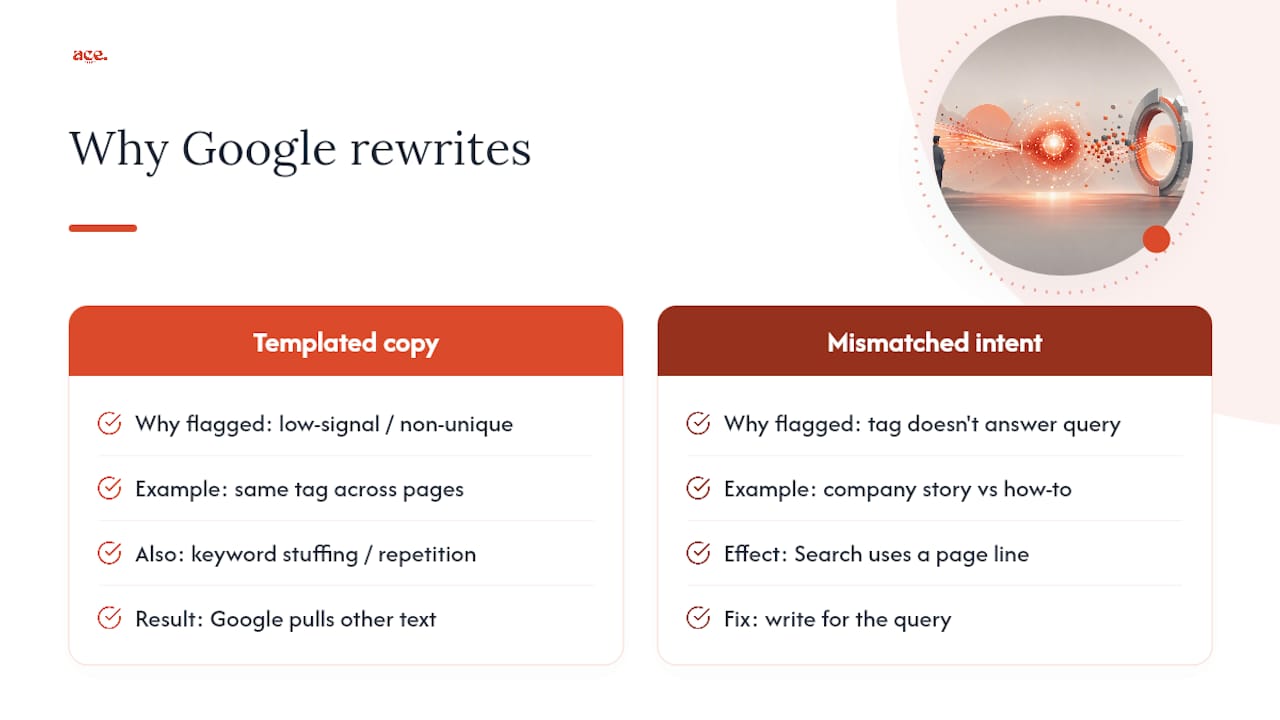
Google rewrites descriptions when it determines other content on your page may better serve the searcher. Certain patterns tend to increase the likelihood of this.
Generic, templated copy is the biggest culprit. If your description could sit on any page on your site unchanged, Google treats it as low-signal and looks elsewhere. Keyword stuffing does the same damage. Cramming your primary term in three times reads as manipulative rather than descriptive, and Google Search Central explicitly favours unique, descriptive tags over repetition.
Mismatched intent is the other big trigger. If someone searches "how to unblock a drain" and your description talks about your company's twenty years of experience, Google will often skip it and pull a line from your actual how-to content instead, because that line answers the query more directly.
Answer engines like AI Overviews and tools such as Perplexity behave similarly; they'll lift a clear, well-matched description when it fits, but they lean on page content just as readily when your tag doesn't hold up. Signal Engine's research on AI search visibility makes a similar point about how clear, specific descriptions improve your odds of being the source an AI answer cites. Write for the query, not for your brand story, and you cut the rewrite risk considerably.
Six steps to write meta descriptions that earn clicks
This is the process worth repeating on every page you touch. It's the same six steps whether you're writing for a blog post or a plumber's service page.
1. Identify the intent and pick one benefit. Before you write a word, decide whether the searcher wants information or wants to act. Someone searching "boiler pressure keeps dropping" wants an answer. Someone searching "boiler repair near me" wants to book someone. Pick the single strongest benefit that matches that intent, and resist the urge to promise three things at once.
2. Front-load the keyword and the benefit. Put your primary keyword and the payoff in the first 60 to 70 characters. Mobile results truncate early, so anything buried at character 140 might never be seen. If your keyword is "emergency plumber London," don't bury it after a scene-setting clause about "trusted local experts."
3. Write short, active copy with one outcome and a micro-CTA. Use verbs, not nouns. "Fix a dripping tap in under 20 minutes" beats "Information about tap repair services." End with a light call to action such as "Book today" or "See how" rather than a full sentence of sales copy.
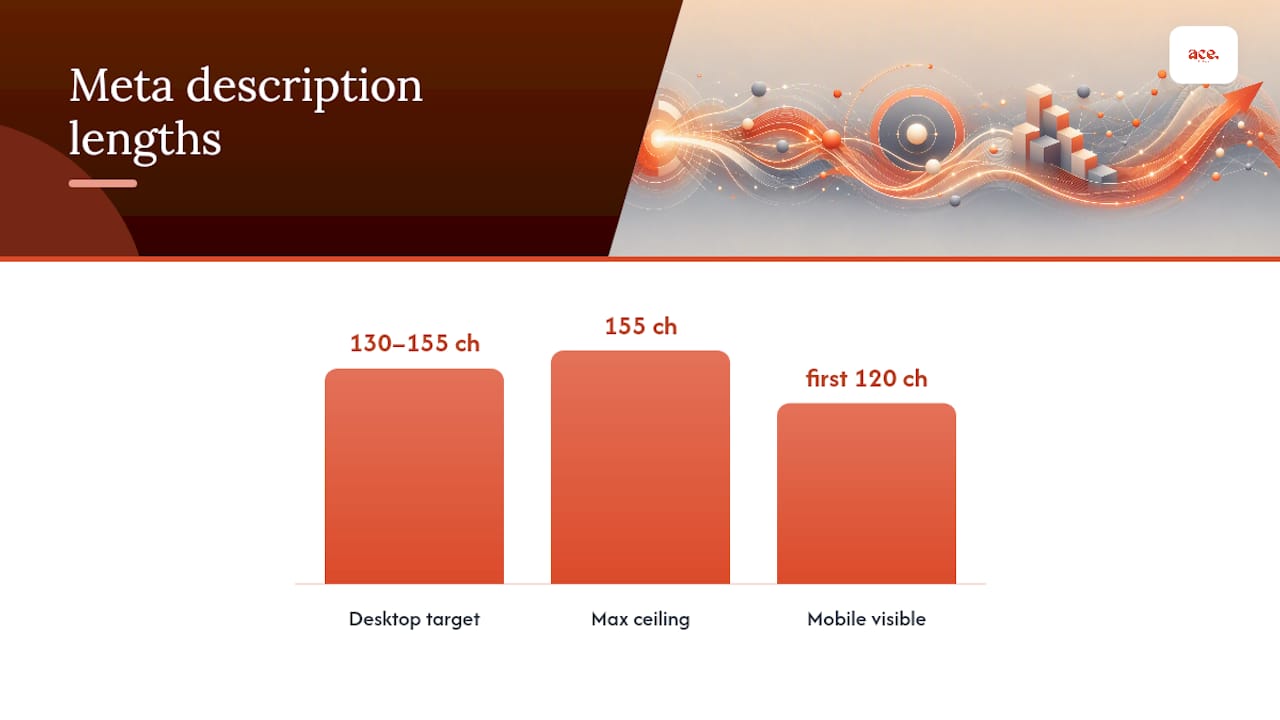
4. Follow the length rules. Aim for 130 to 155 characters on desktop, and make sure the first 120 characters carry your full message, because that's roughly where mobile cuts off. Yoast's guidance uses a similar 155 character ceiling as a practical desktop target.
5. Add a freshness signal only when it helps. If the page is genuinely updated content, such as a pricing guide or a seasonal service page, a small date cue like "Updated January 2026" at the very end can lift trust. Skip it on evergreen service pages where it adds nothing.
6. Write three variations and preview before you publish. Draft three versions, plug each into a SERP preview tool, and pick the one that reads clearest at a glance, not the one that sounds cleverest in your head.
Pro Tip: Read your description out loud in under three seconds. If you stumble or lose the thread, a searcher scanning ten results will skip it just as fast.
How long should a meta description be, and why does pixel width matter more than characters?
Character counts are a useful shorthand, but they're not what Google actually measures. Google truncates based on pixel width, and since letters like "i" and "w" take up wildly different amounts of space, two descriptions with the same character count can display completely differently. A line full of narrow letters might fit 160 characters comfortably; a line full of capitals and wide letters might cut off at 135.
That's why the guidance below is a practical range, not a hard limit:
- Front-load your keyword and benefit within the first 120 characters, since that's roughly where mobile display cuts off.
- Aim for 130 to 155 characters for desktop snippets, following the general ceiling Yoast recommends.
- Preview every description in a SERP snippet tool before publishing, not just a plain character counter.
- Check both mobile and desktop previews separately, since they truncate at different points.
Mobile and desktop display genuinely differently, and treating them as identical is one of the most common mistakes on service-based websites, where most traffic now arrives on a phone. Thestacc's testing on this confirms that mobile truncates earlier, at around 120 characters, which is exactly why step two of the six-step process above puts your strongest words first.
Can you write meta descriptions at scale for large websites?
Programmatic generation makes sense once you're managing hundreds or thousands of pages, such as an ecommerce catalogue or a directory site with one page per location. Writing each one by hand simply isn't realistic at that scale. Google's own guidance is clear that automated generation is fine, provided the results stay human-readable and varied rather than identical templates with a single word swapped, according to Google Search Central.
The failure mode is obvious once you've seen it: a hundred product pages all reading "Buy [Product Name] online. Free delivery. Shop now at [Store]." That's not diverse, and Google will often ignore it in favour of pulling text from the product description itself.
A proper audit catches this before it becomes a habit. Run through these steps:
- Build a full inventory of every URL and its current meta description in a spreadsheet.
- Flag every page with no description at all.
- Search for duplicates, since these are the fastest wins to fix.
- Check for truncation by previewing high-traffic pages in a SERP tool.
- Prioritise fixes by traffic and revenue potential, not alphabetically.
Practical tools for this workflow include a spreadsheet export from your CMS, a free checker such as TabTasker's SEO audit tool, and Aetos SEO's audit approach, which recommends exactly this inventory-then-prioritise order for teams working through large sites.
- Export URLs and descriptions to CSV monthly if your site changes often.
- Colour-code rows for missing, duplicate, and truncated descriptions so fixes are visible at a glance.
What do good meta description examples actually look like?
The clearest way to learn this is to see weak copy rewritten properly. Here are six common page types, before and after.
- Blog post: Before: "Tips and tricks for gardening." After: "Stop tomato blight before it spreads: 5 pruning steps that work in under 10 minutes."
- Product page: Before: "Buy our leather wallets online today." After: "Handstitched leather wallet, RFID-blocking, made in the UK. Ships free tomorrow."
- Service landing page: Before: "We offer plumbing services." After: "Fix a leaking tap or burst pipe today. Same-day plumbers, fixed-price quotes."
- Category page: Before: "Shop our range of garden furniture." After: "Weatherproof garden furniture sets from £199, delivered assembled within 5 days."
- Local service page: Before: "Electrician serving the local area." After: "Need a rewire in Leeds? Licensed electricians, free quotes, booked within 48 hours."
- How-to article: Before: "A guide to fixing a running toilet." After: "Fix a running toilet in 15 minutes with 3 tools you already own. Step-by-step."
The formula behind every one of these: [what this page is] + [specific benefit or outcome] + [micro-CTA, plus a freshness signal if relevant].
Two templates worth keeping handy: for informational pages, "[Do specific thing] in [timeframe] with [method]. [micro-CTA]." For transactional pages, "[Service or product] in [location/context]. [Concrete benefit]. [micro-CTA]."
Who wrote this guide and why trust it?
This guide was written by Gabbi, who covers small business SEO and website management for Ace-sites, focusing on practical implementation over theory..
Ace-sites builds this guidance directly into its platform. It helps local businesses get online quickly and affordably, and its built-in SEO tools and blog manager let you write, preview, and check meta descriptions without touching raw HTML. You can see the toolset on the aceSites features page, and browse examples of how real service businesses structure their pages in the aceSites portfolio.
Why most meta description advice misses the point
Most guides on this topic obsess over character counts as if they were a law rather than a guideline. They're not. The pixel-width mechanics behind truncation mean two descriptions with identical character counts can display completely differently, and I'd rather you write a sharp 148-character line than a padded 155-character one that adds nothing past character 100.
The bigger gap in conventional advice is treating meta descriptions as an SEO checkbox rather than the single piece of ad copy that decides whether your ranking actually earns a visit. A page sitting in position four with a specific, benefit-led description regularly outperforms position two with a vague one. That's the whole game.
If you take one thing from this guide, prioritise the benefit over the keyword. Yes, include your primary term once, early. But the words doing the real work are the ones describing what the searcher actually gets. Write for the click, not for the crawler, and the ranking value tends to follow.
— Gabbi
Get your meta descriptions right without touching a line of code
Ace-sites is the practical alternative to hiring an agency or wrestling with a developer every time you want to update a page's snippet. Every page you build comes with a built-in SEO panel where you set the title tag and meta description directly, preview roughly how it'll look in search results, and adjust before you publish, no HTML required.

If you're building a new site, the AI website builder gets your pages live with editable metadata fields from the start, so you're never bolting SEO on afterwards. If you'd rather hand the whole job over, the done-for-you website service includes metadata setup and an audit as part of the build, covering exactly the checklist above without you lifting a spreadsheet. Start with the builder today, or request a done-for-you quote and let someone else run the audit for you.
Where to check the details yourself
- Google Search Central: the official word on when Google uses your description versus generating its own.
- Yoast's meta description guide: length benchmarks and a plugin-based preview workflow.
- Semrush's meta description breakdown: data on how often provided descriptions actually appear.
- TabTasker's SEO audit tool: a free checker for spotting duplicates and truncation across a site.
Sources
- How to Write Meta Descriptions | Google Search Central
- How to create a good meta description
- What Is a Meta Description? (+ Examples & Tips)
- How to Write Meta Descriptions That Get Clicks (2026)