
A 301 redirect is the HTTP status code that tells browsers and search engines a page has moved permanently, and it passes on most of the ranking value from the old page to the new one, according to Google Search Central. You need one whenever you retire a URL for good: moving to a new domain, restructuring your site, or merging two pages that cover the same topic.
A quick example on Apache looks like this:
Redirect 301 /old-page /new-page
That single line is all a developer needs on a server. If you're on Wix or Webflow, you won't touch code at all. Both have a dashboard tool built for exactly this job.
- Migrating sites? Set up 301s for every changed URL before launch.
- Restructuring folders? Redirect the old path to its closest new equivalent.
- Removing duplicates? Point the weaker page to the one you're keeping.
Pro Tip: If you're unsure whether a change is permanent, use a 302 first while you test, then switch to 301 once you're confident it's staying.
Key Takeaways
A correctly configured 301 redirect preserves search rankings and user trust by permanently mapping old URLs to their most relevant new equivalents, verified through status-code testing.
| Point | Details |
|---|---|
| Use 301 for permanence | Only apply a 301 when the URL change is final; use 302 for anything temporary. |
| Dashboard tools first | Wix, Webflow and cPanel redirect managers are safer than manual server edits for most owners. |
| Map to relevant pages | Redirect to the closest matching new page, never a blanket redirect to the homepage. |
| Test before and after | Check status codes with curl or devtools, and re-test after clearing caches. |
| Avoid chains and loops | Collapse multi-hop redirects into one direct rule and update internal links to match. |
Table of Contents
- Preflight checklist before you set up a 301 redirect
- How do you set up 301 redirects in Wix, Webflow and cPanel?
- What server-side code do you need for Apache, Nginx or IIS?
- How do you check that a redirect is actually working?
- Why do redirects break, and how do you fix them?
- What should you do after you set up a 301 redirect?
- When should you DIY, and when should you get help?
- Why most redirect advice skips the boring bit that actually matters
- Sources
Preflight checklist before you set up a 301 redirect
Getting this right the first time saves you hours of cleanup later. Before you touch anything, work through this order:
- List every old URL and its replacement. A simple spreadsheet works fine, one row per redirect.
- Confirm it's permanent. Only use 301 if you won't be reverting the page, otherwise use a temporary redirect instead.
- Back up your config. If you're editing
.htaccessor server files, save a copy first and note how you access it, whether that's cPanel, SSH, or an FTP client. - Check for a dashboard tool. Wix and Webflow both handle redirects natively, and most hosting panels do too.
Pro Tip: Redirecting via a platform dashboard is generally safer than editing server files by hand, because it avoids the syntax mistakes that cause blank pages or server errors.
How do you set up 301 redirects in Wix, Webflow and cPanel?
Most small business owners never need to write a line of code. The four platforms below cover almost every non-technical scenario.
Wix: Go to your dashboard, open SEO & GEO, then find the URL Redirect Manager. Click "New Redirect", enter the old path, paste in the new URL, and save. Wix applies it instantly across the live site.
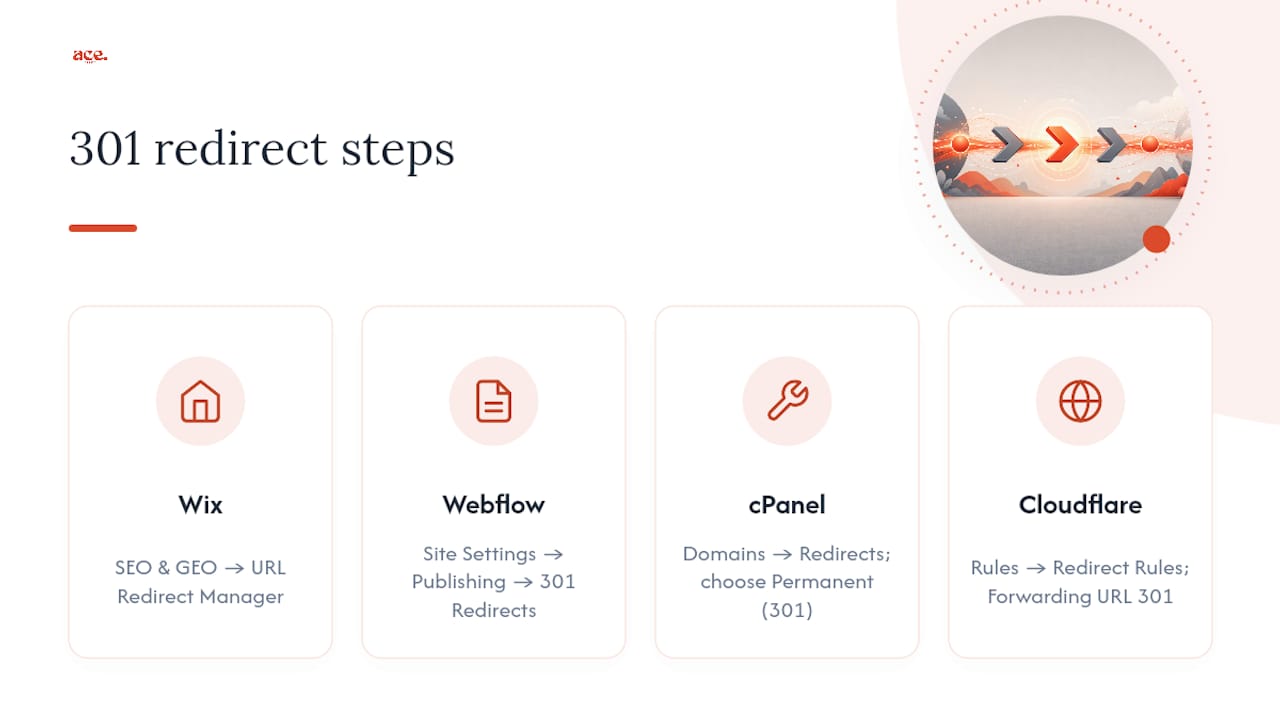
Webflow: Head to Site Settings, then Publishing, and scroll to 301 Redirects. Enter the old path as a relative URL (something like /old-service-page, not the full domain) and the destination page. You must republish the site for the change to take effect, which catches people out more than any other step in Webflow's process.
cPanel or host dashboard: Under Domains, look for a Redirects tool. Choose Permanent (301) from the dropdown, enter the source and destination, and save. This writes the .htaccess rule for you, so you get the SEO benefit without touching code.
Cloudflare: Open Rules, then either Page Rules or the newer Redirect Rules feature. Set the "Forwarding URL" type to 301 Permanent Redirect, define the source pattern, and enter the target. This works even if your actual hosting doesn't offer redirect tools.
Pro Tip: If you're weighing up whether your current platform makes this easy, it's worth reading how Wix alternatives or Webflow alternatives compare on built-in SEO tools before you commit to a bigger migration.
What server-side code do you need for Apache, Nginx or IIS?
If you manage your own server, or you're briefing a developer, these are the exact patterns you'll use.
Apache (.htaccess): For a single page, Redirect 301 /old-page /new-page does the job. For an entire folder that's moved, use mod_rewrite: RewriteRule ^old/(.*)$ /new/$1 [R=301,L]. Placement matters. Rules must sit inside the correct .htaccess file, and specific rules should come before general ones, since Google Search Central notes that rule order determines which one actually fires.
Nginx: A single page uses return 301 https://example.com/new-page; inside the relevant server block. For directories, a rewrite pattern handles the mapping, as MDN's redirection guide explains. You'll need admin access to the config files and a reload of the Nginx service afterwards.
IIS: Open IIS Manager, select the site or folder, and use the HTTP Redirect feature. Tick "Redirect requests to this destination", set the status as Permanent (301), and apply it.
Editing
.htaccesson an Nginx server does nothing, and vice versa. Confirm which software your host actually runs before you touch a single file.
| Server | Method | Best for |
|---|---|---|
| Apache | .htaccess with Redirect 301 or RewriteRule | Single pages or folder moves |
| Nginx | return 301 or rewrite block | High-traffic sites needing speed |
| IIS | HTTP Redirect feature in IIS Manager | Windows-hosted business sites |
Always test incrementally. One bad rule can trigger a 500 error across the whole site, not just the page you're redirecting.
How do you check that a redirect is actually working?
Open your browser's devtools, go to the Network tab, then visit the old URL. You should see a status of 301 and a Location header pointing to the new address.
- Run
curl -I https://old-url.comfrom a terminal to see the raw response headers without loading a full page. - Use a redirect-checker tool to spot chains, where one redirect leads to another, adding unnecessary hops.
- Test with a temporary 302 first if you're not confident, then switch to 301 once behaviour is confirmed, a step InMotion Hosting recommends to avoid search engines indexing a broken permanent rule too early.
- Recheck after 24 to 48 hours, since some caching layers delay the visible change.
Why do redirects break, and how do you fix them?
Most redirect problems fall into a handful of repeat offenders.
- Chains: Old URL → intermediate URL → final URL adds latency and can dilute ranking signals; collapse it into one direct hop and update the internal links pointing to it.
- Loops: Usually caused by a rule referencing itself, or two conditions that contradict each other; check rule order and wildcards carefully.
- Caching: Browser cache, Cloudflare's edge cache, and your host's server cache can all show you an old result even after the fix works. Clear each one separately.
- Wrong status code: A 302 or a meta refresh tag doesn't carry the same permanence signal as a 301, so swap these out wherever the move is genuinely permanent.
Pro Tip: If a page still shows the old content after you've fixed the redirect, purge Cloudflare's cache before assuming your rule is broken.
What should you do after you set up a 301 redirect?
The redirect itself is only half the job. Point every old URL to its closest genuine equivalent, never a blanket redirect to the homepage, since that tells both users and search engines nothing about where their content went.
- Update internal links, navigation menus and buttons so they point straight to the final destination, not the old redirected path.
- Submit an updated sitemap once the new structure is live, and check indexing in your search console of choice.
- Watch traffic and crawl reports over the following weeks. A sudden drop usually means a mapping mistake, not a ranking penalty.
- Remove old URLs from your sitemap once you can confirm search engines have picked up the new ones.
If you're auditing content while you do this, it's a good moment to check whether pages should be merged or kept separate rather than redirected on autopilot.
When should you DIY, and when should you get help?
If you're on Wix, Webflow, or a host with a redirect dashboard, and you've only got a handful of URLs to move, do it yourself. It takes minutes and carries almost no risk.
Get a developer or Ace-sites involved if you don't have server file access, or you're dealing with dozens of pattern-based redirects. Hand them this:
- Your old-to-new URL mapping sheet
- Access details (cPanel, SSH, or dashboard login)
- The tests you expect to see pass (status code, no loops, no chains)
Why most redirect advice skips the boring bit that actually matters
Most guides on this topic obsess over server syntax and treat the platform dashboard route as a lesser option for people who "can't code properly." That gets it backwards. Google's own guidance treats a correctly configured redirect from a Wix or Webflow dashboard exactly the same as one hand-written in .htaccess. The status code is what matters, not how elegantly you produced it.
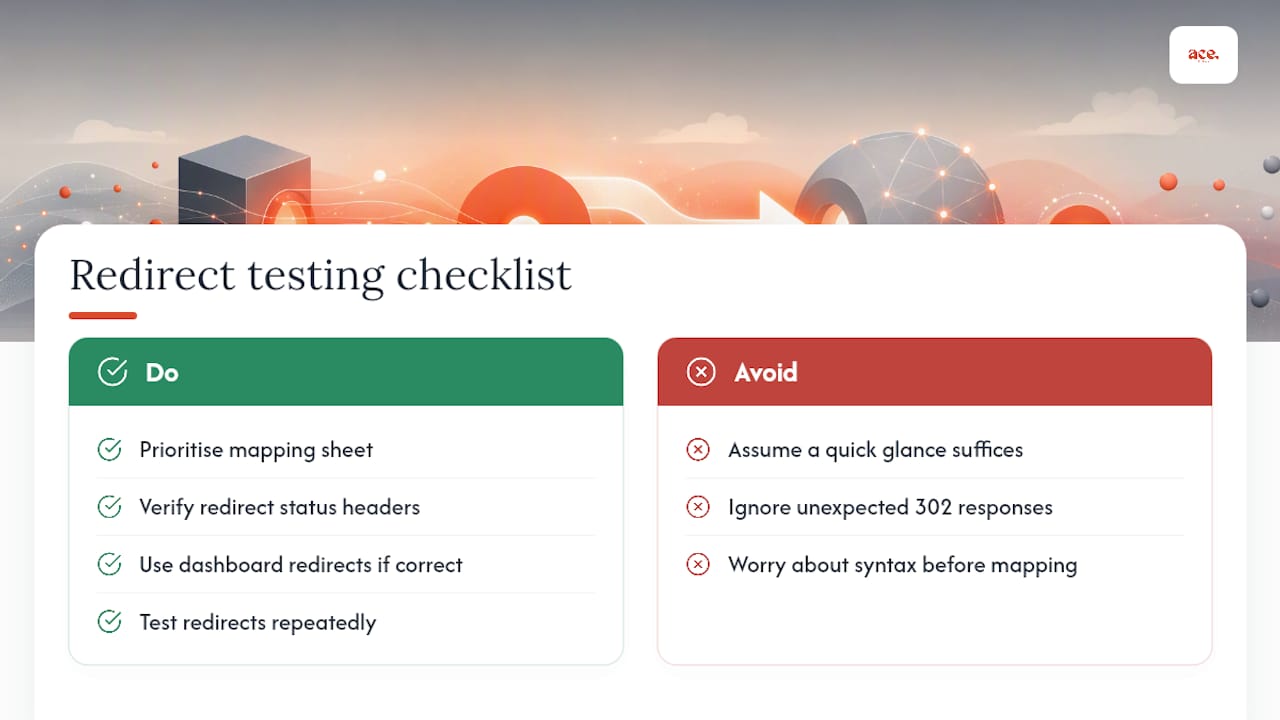
Where conventional advice genuinely falls short is testing discipline. Plenty of small business owners set up a redirect, glance at the page once, and move on. They never check the actual header response, so a redirect quietly returning 302 instead of 301 sits there for months, giving away none of the ranking benefit they assumed they'd banked.
Prioritise the mapping sheet before anything else. A beautifully coded Nginx rule pointed at the wrong page is worse than a clumsy Wix redirect pointed at the right one. Get the destination correct first, then worry about the method.
— Gabbi
Ready to stop wrestling with redirect syntax altogether? Ace-sites gives you a built-in SEO toolkit and a dashboard-managed website, so moving or restructuring pages never means touching a config file. If you'd rather hand the whole job over, our done for you website build covers migrations, redirects and everything in between, with nothing to pay until you've seen the result.
Sources
For deeper technical detail, Google Search Central covers SEO guidance, MDN documents the 301 status code itself, and Linkly's guide covers additional tools like URL shorteners.