For most independent UK restaurants, cafés, and takeaways, Ace-sites is the most practical starting point. It goes live in under a day, includes built-in SEO tools, supports booking widget embeds, and lets you edit everything yourself without touching code. There are no hidden fees, and the optional "done-for-you" build means you can see your site before spending a penny.
- Fast to launch: templated builds go live in hours, not weeks
- Built-in SEO tools and blog manager for local search visibility
- Booking widget embeds and contact forms ready out of the box
- Mobile-optimised templates with SSL included as standard
- Optional bespoke design project for restaurants that want something custom
Ready to see it? Ace-sites offers a free done-for-you build where you pay nothing until you've seen the finished site.
Table of Contents
- Which type of restaurant website builder suits you?
- What features does a restaurant website actually need?
- How to choose: a practical checklist for UK owners
- Typical UK pricing and how long it takes to go live
- Why Ace-sites works well for UK restaurant owners
- What happens after your restaurant site goes live?
- How much design flexibility do you actually need?
- Key takeaways
- What the team at Ace-sites actually sees with restaurant sites
- Your restaurant site, built and live before you pay a penny
- Useful sources and further reading
Which type of restaurant website builder suits you?
A 2026 comparative analysis groups restaurant site design tools into three practical categories. Knowing which one fits your situation saves you weeks of trial and error.
Category A: Restaurant-native platforms These include integrated ordering, POS sync, and menu management as core features. They suit restaurants where online orders are a meaningful share of revenue. The tradeoff is cost: production-ready ordering and integrations are almost always on paid tiers, and free or very low entry tiers rarely handle real order volume reliably.

Category B: Hospitality and design-focused platforms These prioritise visual storytelling and brand presence over transactional features. They work well for multi-concept groups, high-end dining, or restaurants where atmosphere sells the booking. Expect to bolt on third-party ordering tools separately.
Category C: Budget DIY and general builders Large general-purpose builders offer polished templates and easy editing, but ordering and reservations usually require third-party add-ons. They suit owners who value visual control and have a low order volume, or who are testing a concept before committing to a full setup.
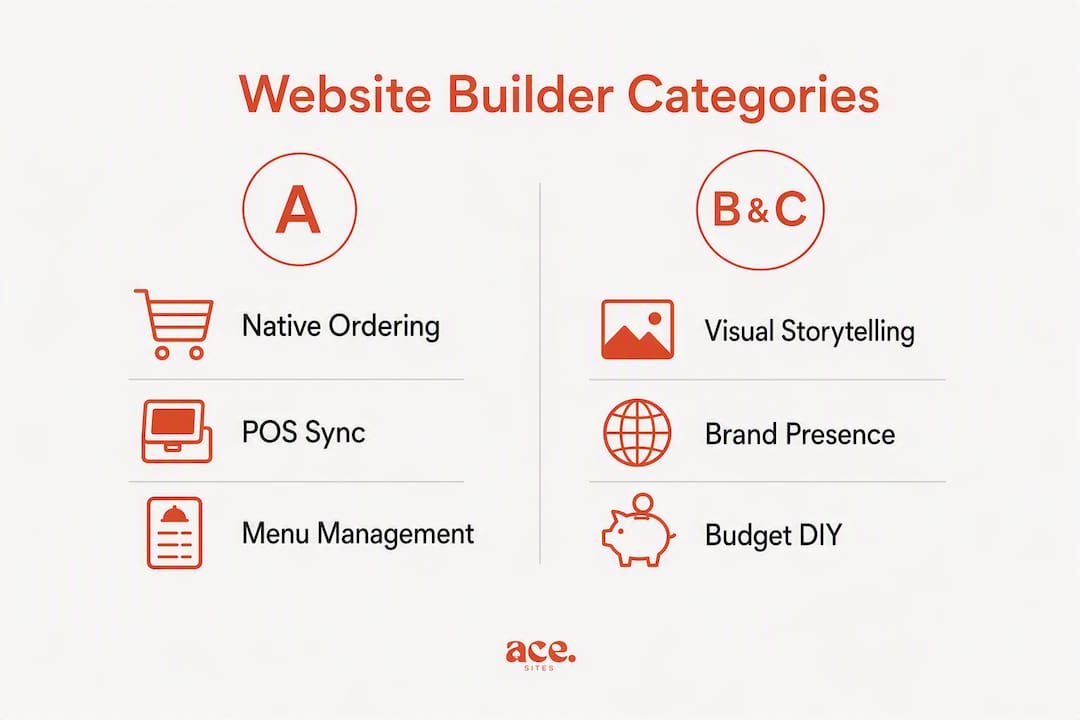
The practical question is simple: if online orders matter to your revenue, lean towards Category A or a platform like Ace-sites that handles the core features without a fragmented plugin stack. If brand storytelling is the priority, Category B earns its place. If budget is the hard constraint and orders are low, Category C gets you online fast.
What features does a restaurant website actually need?
Not every feature on a vendor's marketing page matters equally. These are the ones that directly affect revenue and daily operations.
Transactional features
- Native online ordering with a clear commission policy. Flat monthly fees with commission-free ordering often work out cheaper than a low-cost site that routes orders through commissioned channels once volume grows.
- Menu management with live updates. A site reading directly from your POS reflects price changes and availability instantly, preventing stale menus after a week.
- Table reservations or a booking widget embed.
- POS and delivery platform integrations so customer data flows into one place.
Visibility and conversion
- Mobile-first design. Mobile ordering UX is the decisive conversion factor: check the checkout flow on a phone during any demo, not just the desktop layout.
- Local SEO architecture: clean URL structures, schema markup for menus and opening hours, and fast page speed.
- Clear calls to action for ordering and booking above the fold.
Operational and compliance
- Analytics and order reporting so you can act on customer behaviour, not just collect it.
- UK accessibility compliance and GDPR-ready defaults: cookie consent, data exportability, and a clear privacy page.
- SSL certificate as standard.
- Reliable support during UK business hours.
Pro Tip: Set up a single canonical menu source, whether that is your POS or a central admin panel, and make sure your website reads from it. Updating menus in two places is how stale content and pricing errors creep in.
How to choose: a practical checklist for UK owners
Use this when you are on a demo call or comparing platforms side by side.
- Is ordering built in or bolted on? Native ordering is simpler to manage and usually cheaper long-term.
- What is the commission model? Ask directly: "Is ordering commission-free on this plan?"
- How does menu sync work? Ask: "Does the site update automatically when I change a price in my POS?"
- Can I export customer data? You need this for email marketing and GDPR compliance.
- What are your UK support hours? A US-based support team with no UK hours is a practical problem.
- How fast can we go live? Ask for a real example, not a marketing claim.
Red flags to watch for:
- Orders redirect to a third-party domain at checkout (kills conversion and trust)
- Core features like reservations require separate paid plugins
- Hidden per-order fees buried in the small print
- No way to export your customer or order data
- Poor mobile checkout flow on the demo
If you want a scoring method, rate each criterion 1–5 and weight the transactional features (ordering, POS sync, mobile checkout) more heavily if online orders are a significant part of your revenue.
Typical UK pricing and how long it takes to go live
Costs vary significantly depending on what you need. Here is a realistic picture for UK restaurants.
| Tier | Typical monthly cost | What it usually includes |
|---|---|---|
| Free / experiment | — | Basic pages, limited templates, no native ordering |
| Basic SaaS | — | Templates, SEO tools, contact forms, booking widgets |
| Premium SaaS | — | Native ordering, POS integrations, analytics, priority support |
| Bespoke design | — | Custom design, migration, managed onboarding |
For a detailed breakdown of what a small business website should cost, Ace-sites covers this clearly.
Timeline expectations:
- Templated builder with your own content: live in a few hours to one day
- Managed or "done for you" build: typically 2–5 working days depending on content readiness
- Custom design or migration from an existing site: 1–4 weeks
The fastest way to accelerate a go-live is to have your menu, photos, opening hours, and contact details ready before the vendor starts. Waiting on content is the most common cause of delays, not the platform itself.
Why Ace-sites works well for UK restaurant owners
Ace-sites maps directly to the checklist above. The platform includes built-in SEO tools, mobile-optimised templates, booking widget embeds, an announcement bar, a pop-up builder, SSL as standard, and a blog manager for local content. You edit everything yourself through a visual editor with no code required. See the full feature set here.
The optional "done for you" offer is particularly useful for restaurant owners who are short on time: Ace-sites builds the site for you, and you pay nothing until you have seen and approved it. That removes the risk of committing budget before you know what you are getting.
- Templates are mobile-optimised and updated periodically, so your site stays current without a rebuild
- Built-in SEO tools support local search visibility from day one
- Restaurants that prioritise SEO architecture typically see measurable local search improvements within 2–3 months
- GDPR-compatible defaults and SSL are included, covering the UK compliance baseline
- The blog manager supports ongoing local content without needing an agency
Browse the Ace-sites portfolio to see real UK business sites built on the platform, and ask for examples in your town or sector when you make contact.
What happens after your restaurant site goes live?
The first week after launch is when most owners realise what they should have set up from the start. Here is what to focus on.
Orders and bookings: Check that your ordering flow works end-to-end on a mobile phone before you promote the site. One broken step in the checkout loses the order. If you have a booking widget embedded, test it from a fresh browser session.
Analytics: Connect Google Search Console and Google Analytics (or your platform's built-in analytics) on day one. You want to see which pages get traffic, where visitors drop off, and which search terms bring people to your site. Without this, you are flying blind.
Maintenance: The main ongoing tasks are keeping your menu accurate, updating opening hours for bank holidays, and adding occasional blog posts for local SEO. With a platform like Ace-sites, these updates take minutes rather than a call to an agency.
How much design flexibility do you actually need?
Most independent restaurants need less design customisation than they think. A clean, fast, mobile-ready template with your logo, brand colours, and good food photography will outperform a heavily customised site that loads slowly or is hard to update.
That said, branding does matter. Look for a platform that lets you set your own colour palette, upload custom fonts or use web-safe alternatives, and arrange sections without being locked into a rigid grid. Ace-sites gives you custom branding controls, unlimited pages, and a visual editor so you can adjust layouts without a developer.
Where bespoke design earns its cost is for multi-site groups, high-end restaurants with a strong visual identity, or owners who want something that looks genuinely different from a template. For everyone else, a well-configured template with strong photography does the job.
Key takeaways
The best restaurant website builder for most UK independents is one that goes live fast, handles ordering and local SEO without a plugin stack, and lets you maintain it yourself.
| Point | Details |
|---|---|
| Prioritise ordering and menu sync | Native ordering and live menu sync prevent stale content and reduce long-term costs. |
| Test mobile checkout on every demo | Mobile conversion is where orders are won or lost; check it before committing. |
| Budget for the right tier | Free tiers suit experiments; production ordering and integrations need a paid plan. |
| Ask the five demo questions | Commission model, menu sync, data export, support hours, and time-to-live are non-negotiable. |
| Try Ace-sites first | Ace-sites offers a free done-for-you build: see the site before you pay, go live in under a day. |
What the team at Ace-sites actually sees with restaurant sites
The restaurants that get the most from their websites are not the ones with the most elaborate designs. They are the ones that sorted out three things early: a mobile checkout that works, a menu that stays accurate, and a Google presence that puts them in front of local searches.
The most common mistake we see is over-designing before the basics are in place. An owner spends weeks on fonts and colour palettes, then launches a site with a menu that is already out of date and a checkout that redirects to a third-party domain on mobile. That combination loses orders on day one.
The second mistake is underestimating how much friction a slow or clunky mobile checkout creates. Customers do not give you a second chance if the ordering process breaks on their phone. Check it yourself, on your own phone, before you tell anyone the site is live.
The fix for both is to start with a solid template, get the transactional features working correctly, and then refine the design over time. Ace-sites is built around that order of priorities: fast to launch, easy to maintain, and structured for local search from the start.
Your restaurant site, built and live before you pay a penny
Ace-sites builds your restaurant website for you, and you pay nothing until you have seen and approved it. That is the "done for you" offer, and it is the lowest-risk way to get a professional site live quickly.
Here is what happens when you get in touch. You share your menu, a few photos, your opening hours, and your contact details. Ace-sites builds the site on a mobile-optimised template with built-in SEO tools, SSL, and booking widget support. You review it. If you are happy, you go live. If you want changes, you ask for them before committing.
After launch, you manage the site yourself through the visual editor. No agency calls for menu updates, no monthly retainer for small changes. Just a straightforward monthly subscription with no hidden costs.
See the free done-for-you offer and get your restaurant online this week.
Useful sources and further reading
When you are evaluating any restaurant website platform, look for exportable customer data, a mobile checkout demo on a real phone, and a genuine time-to-live case study from a business similar to yours. Ask for UK references or portfolio examples from your region.
- 7 Best Restaurant Website Builders for 2026 — category comparison and commission model analysis
- Choose POS Website Builder — integrated ordering, SEO architecture, and analytics framing
- Zuvesa Restaurant Website Builder — live menu sync and POS-driven content
- Canva Restaurant Website Builder — general-purpose DIY template approach
- Ace-sites small business website cost guide — UK-specific budgeting guidance
- Small business website builder alternatives — broader category context for UK owners
This article provides general guidance on website platform selection. It is not legal or financial advice. Confirm current pricing, compliance requirements, and platform capabilities directly with vendors before committing.