
Most small business websites work best with a moderate number of pages. That range covers a homepage, a services area, an about page, contact details, and enough proof (testimonials, FAQs) to earn trust without drowning visitors in choice.
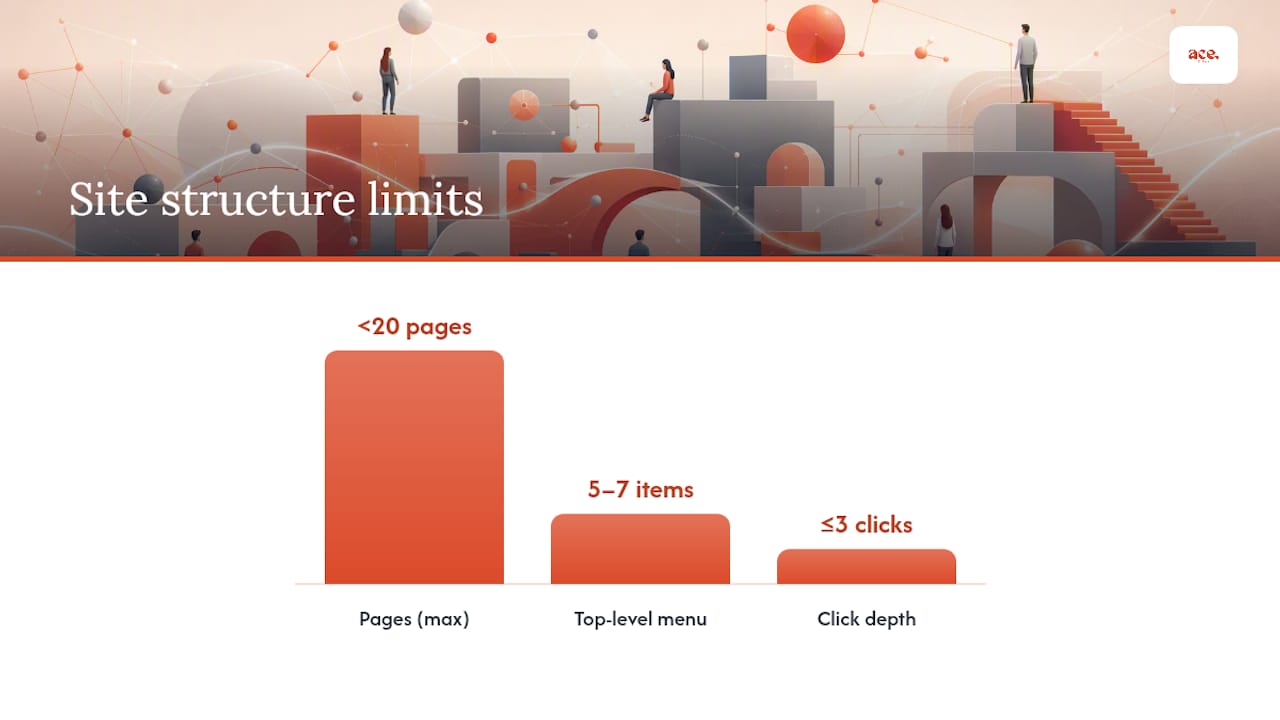
Here's your rule of thumb: if you offer four services, plan for four service pages plus your core pages (home, about, contact, and one or two trust pages). That's it. You don't need fifty pages to look professional. You need the right ones, structured so nothing is more than three clicks from your homepage.
- The 3-click rule: every important page (pricing, a specific service, your contact form) should be reachable within three clicks of your homepage.
- One service, one page: don't cram five services onto one crowded page.
- Hub-and-spoke or flat: choose your structure based on size, not fashion.
A platform like aceSites is built around exactly this kind of lean, purposeful structure, so you're not fighting the tool to get it right.
Key Takeaways
Most small business websites perform best with 8 to 15 focused pages, built around one page per service and kept within three clicks of the homepage.
| Point | Details |
|---|---|
| Match pages to services | Create one dedicated page per service rather than cramming everything onto a single page. |
| Keep navigation shallow | Follow the 3-click rule and limit your top-level menu to 5 to 7 items. |
| Launch lean, then expand | Start with core pages (home, services, about, contact) and add blog or location pages once demand proves it. |
| Every page needs one job | Give each page a single clear call to action and a trust signal like a testimonial. |
| Build it fast with aceSites | Ace-sites lets you create and launch this exact page structure with visual editing, SEO tools, and SSL included from day one. |
Table of Contents
- How many pages does a website need for different business types?
- What pages does every small business website need?
- Should your site be flat, hierarchical, or hub-and-spoke?
- What SEO checks does each page need before launch?
- What's the launch checklist and sample sitemap?
- Why focus beats a bloated sitemap
- How can aceSites help you build the right pages fast?
- Frequently asked questions
- Sources
How many pages does a website need for different business types?
The honest answer is "it depends on what you sell and how many ways people need to find you." Here's how that plays out in practice.
- Micro brochure site (4 to 6 pages) — a sole trader offering one core service. Home, about, services, contact, maybe a testimonials page. You don't need more, and adding filler pages just for the sake of "looking bigger" dilutes your message rather than strengthening it.
- Standard service business (8 to 12 pages) — a plumber, electrician, or beautician with 3 to 5 distinct services. Each service gets its own page because search engines and customers both want specifics, not a vague "we do everything" paragraph. The SBA notes that five essential pages (home, about, services, contact, privacy/terms) plus three recommended extras (FAQ, testimonials, blog) covers most small businesses comfortably.
- Multi-service business (12 to 20 pages) — think a home renovation firm covering kitchens, bathrooms, extensions, and landscaping. Follow the one service, one page principle: each service deserves its own dedicated page so both Google and your customer can find exactly what they're after without wading through unrelated content.
- Content-led growth site (20+ pages) — businesses using a blog or resource hub to build authority over time. This is where a hub-and-spoke model earns its keep, clustering articles around pillar topics that support your core service pages.
The pattern here is simple: your page count should mirror the number of decisions a customer needs to make, not your ambition for how big the business "feels."
What pages does every small business website need?
Every page on your site should do a job. If it doesn't have a clear purpose, cut it. Here's the checklist to work through, and what each page absolutely must include.
- Homepage — clear headline stating what you do and for whom, one primary call to action, and a way to reach you above the fold.
- Service overview page — a short summary of everything you offer, linking out to individual service pages.
- Service detail pages (one per service) — headline naming the service, who it's for, pricing indication if possible, and a booking or enquiry CTA.
- About page — your story, your team, and why customers should trust you over the next search result.
- Contact page — phone number, email, a simple form, and your service area or address.
- Pricing or estimate page — even rough guide prices reduce time-wasting enquiries.
- Testimonials or case studies — real feedback builds the confidence a stranger needs before calling.
- FAQ page — answers your team gets asked daily; this doubles as content that can carry FAQ schema for search visibility.
- Privacy policy and terms — required, unglamorous, but non-negotiable.
If you're tight on time or budget, prioritise service-detail pages and an easy contact path first; pricing, FAQ, and a blog can follow once the essentials are live.
Pro Tip: Give every page exactly one call to action. A homepage asking visitors to "call us, book online, and follow us on Instagram" all at once usually gets none of the three.
Should your site be flat, hierarchical, or hub-and-spoke?
Three structures cover almost every small business site. The flat model keeps everything one or two clicks from the homepage and suits sites under 20 pages. The hub-and-spoke model organises content around central pillar pages, which works well once you're publishing regularly. Most service businesses do best with a hybrid: a flat hierarchical core for services and contact, with a hub-and-spoke resource area for blog content as it grows.
Whichever model you pick, stick to the 3-click rule: if a visitor needs five clicks to find your pricing, your architecture is too deep.
- Keep your top-level menu to 5 to 7 items — more than that increases cognitive load and quietly costs you conversions.
- Use plain labels ("Services", "About", "Contact") over clever ones.
- Link from hub pages (like your services overview) down to each spoke (individual service pages).
A simple hybrid sitemap for a service business looks like this: Home → Services (hub) → Kitchen Fitting, Bathroom Fitting, Extensions (spokes) → About → Contact.
Pro Tip: If you can't explain your site structure out loud in one breath, it's too complicated for a first-time visitor to navigate either.
What SEO checks does each page need before launch?
Every page you publish should carry a handful of basics before it goes live. For each core page, check off:
- A clear page intent (what should the visitor do here?)
- One descriptive H1 matching what the page is actually about
- A unique meta title and meta description
- One obvious call to action
- Schema markup where relevant (Organisation, LocalBusiness, or FAQ schema)
- Mobile display checked on an actual phone, not just a browser resize
- Page speed checked, since slow-loading pages lose visitors before they read a word
Three technical items matter before you go live at all: submit a sitemap.xml, set up your robots.txt file, and install an SSL certificate. None of these are optional extras. A site without SSL actively warns visitors it's insecure before they've read a single word.
Map each page to a step in your customer's journey. Someone landing on a service page is closer to booking than someone reading a blog post, so their CTA should be firmer ("Get a quote") while a blog post CTA can be softer ("Read more" or "See our services").
What's the launch checklist and sample sitemap?
Before you flip the site live, run through this:
- Install SSL and check it's active across every page.
- Set up analytics tracking so you can see what's actually working.
- Test every contact form end to end, including the email it sends to.
- Check mobile display on at least two screen sizes.
- Submit your sitemap.xml to search engines.
- Publish your privacy policy and terms.
- Check page speed on your homepage and top service pages.
Here are three sitemaps to copy and adapt:
Micro brochure (5 pages): Home, About, Services, Testimonials, Contact.
Single-location service business, 4 services (10 pages): Home, Services (hub), Service 1, Service 2, Service 3, Service 4, About, Testimonials, FAQ, Contact.
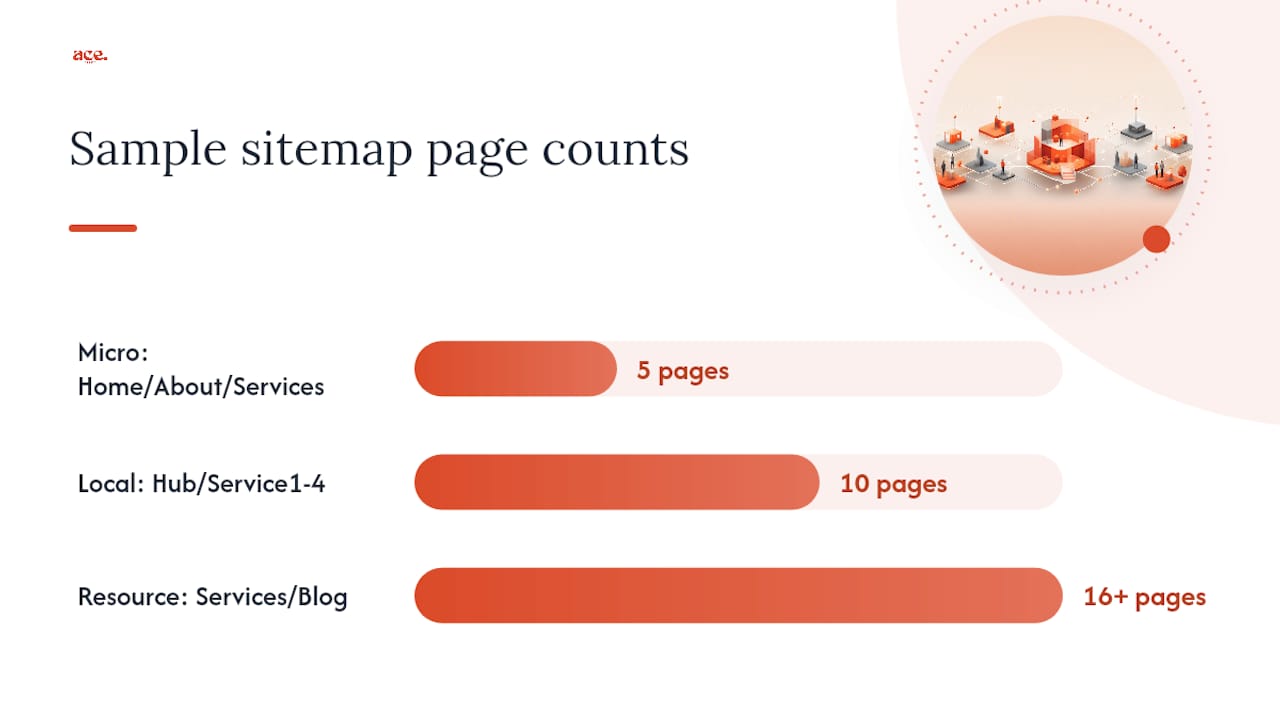
Service business with resource hub (16+ pages): Home, Services (hub), 4 service pages, About, Testimonials, FAQ, Contact, Blog (hub), 3+ blog posts organised by topic.
As you grow, expand naturally: add location pages if you serve multiple towns, add case studies as you complete standout jobs, and let your blog become a genuine resource hub rather than an afterthought nobody updates.
Why focus beats a bloated sitemap
Owners often assume more pages signal more credibility. In practice, the opposite tends to happen: a lean site with ten sharp, useful pages converts better than thirty half-finished ones, because visitors can find what they need without hunting. The businesses that struggle are usually the ones that built every page they could think of on day one, then never maintained half of them.
Working with local businesses launching quickly shapes this view. The ones that succeed early pick a focused page set, get it live, and expand only once they've proven what customers actually ask for. Scale later. Launch simple now.
How can aceSites help you build the right pages fast?
aceSites gets you from "I need a website" to a live, professional site with every page on this checklist in place, without weeks of back-and-forth with a designer. The visual editor lets you build homepage, service, about, and contact pages without touching code, and the built-in SEO tools handle meta titles and descriptions as you go.
- Visual editing for every page type covered in this guide
- Built-in blog manager for your resource hub as you grow
- Booking widget embeds for service enquiries
- Free SSL certificate included on every site
- Optional done-for-you build if you'd rather hand the whole thing over
If you'd rather see the finished structure than build it from scratch, start with a free website build and pay nothing until you've seen it live.
Frequently asked questions
How many pages should a website have for a brand new small business? Start with 5 to 8 pages: home, about, services, contact, and one trust page such as testimonials. Add more once you understand which pages customers actually use.
How many pages for SEO purposes specifically? There's no fixed number for SEO. What matters is that each page targets one clear topic or service, since search engines reward specificity over broad, catch-all pages.
Does a bigger website page count help rankings? Not by itself. A focused ten-page site with strong, specific content will usually outperform a sprawling thirty-page site full of thin, repetitive pages.
How do I decide website page count if I offer several services? Count your distinct services and give each its own page, then add your core pages (home, about, contact) on top. That total is your starting page count.
Can I add more pages later without hurting my structure? Yes. Add new service pages, location pages, or blog posts as hubs and spokes off your existing structure, keeping the 3-click rule intact as you grow.