
For most UK salon owners, Ace-sites is the recommended pick. It gets you live in under a day, includes booking widget embeds, built-in SEO tools, and mobile-optimised templates, all on a straightforward monthly subscription with no hidden costs.
If your priorities differ, here is a compact shortlist:
- Fast launch with booking support — managed SaaS builders like Ace-sites let you go from sign-up to live site in hours, with booking widgets ready to embed from day one.
- Design-first builders — ideal if polished visuals and portfolio presentation matter most to your brand.
- Drag-and-drop builders — good for salons that want a large template library and simple built-in booking without any technical setup.
- Commerce-first platforms — worth considering only if you plan to sell retail products at scale alongside appointments.
- Open-source / self-hosted platforms — maximum flexibility, but require technical skill or a developer budget.
Industry roundups consistently place booking integration and mobile performance above template aesthetics as the two factors that most directly drive revenue for small salons. A beautiful site that cannot take bookings on mobile is simply not working hard enough for you.
Table of Contents
- How do the best salon website builders compare at a glance?
- What should you look for in a salon website builder?
- Why Ace-sites is the recommended pick for most UK salons
- How do drag-and-drop builders like Wix perform for salons?
- Are design-first builders like Squarespace worth it for salons?
- When does a commerce-first builder like Shopify make sense for a salon?
- Is WordPress the right choice for your salon site?
- How do the top builders compare on features salons actually need?
- How to get your salon website live in under a day
- Which marketing tools should your salon website connect to?
- What do salons actually say about these builders?
- Key takeaways
- The honest view on salon website builders
- Ace-sites gets your salon online fast, without the agency price tag
- Sources and where to read more
How do the best salon website builders compare at a glance?
The table below covers the main builder categories on the criteria that matter most for UK salons. Ace-sites leads the table as the article's recommended option.
| Builder | Best for | Ease of use | Salon templates & design | Appointment booking | Ecommerce | SEO & local SEO | UK pricing & payments | Support & reliability |
|---|---|---|---|---|---|---|---|---|
| Ace-sites | Local salons wanting fast, managed launch | Very easy — live in under a day | Mobile-optimised, salon-friendly templates | Booking widget embeds, contact forms | Basic product/service listings | Built-in SEO tools, blog manager, SSL | Monthly SaaS; UK payment gateway compatible | Dedicated support; optional done-for-you service |
| Drag-and-drop builders (e.g. Wix) | Salons wanting many templates and simple booking | Easy — visual editor, no code | Large template library, salon-specific options | Native booking modules and first-party apps | Moderate ecommerce tools | Good SEO settings; local SEO manageable | At a moderate monthly price; Stripe and PayPal | Community and chat support |
| Design-first builders (e.g. Squarespace) | Visually driven or high-end salons | Moderate — polished but less flexible | High-quality, design-oriented templates | Built-in scheduling (Acuity integration) | Moderate; transaction fees on lower plans | Solid SEO; less granular local control | At a moderate monthly price; Stripe supported | 24/7 email and chat support |
| Commerce-first platforms (e.g. Shopify) | Salons selling retail products at scale | Moderate — commerce setup takes time | Fewer salon-specific templates | Via third-party apps | Comprehensive inventory and POS | Good SEO; strong product schema | From a moderate monthly price; many UK gateways | 24/7 support across channels |
| Open-source / self-hosted (e.g. WordPress) | Salons needing full customisation and SEO control | Complex — requires technical skill | Thousands of themes; quality varies | Via plugins (e.g. Bookly, Amelia) | Full ecommerce via WooCommerce | Near-unlimited SEO control | Hosting starts from a low monthly price plus plugins | Community forums; no central support |
| Simple rapid builders (e.g. SITE123, Webador, IONOS) | Owners needing a basic site fast | Very easy | Limited salon-specific templates | Basic or via embeds | Simple product listings | Basic SEO settings | Low entry cost; bundled hosting options | Email and chat support |
| Design marketplace (e.g. 99Designs) | Salons wanting bespoke branding or custom assets | N/A — commission-based service | Custom, one-off design work | Not applicable | Not applicable | Depends on delivery platform | Project-based pricing | Designer communication via platform |
| Integrated booking platforms (e.g. Square Online) | Salons already using Square for POS | Easy if already on Square | Limited design flexibility | Tight Square POS integration | Square commerce tools | Basic SEO | Free tier; transaction fees apply; UK-ready | Square support channels |
For a typical small UK salon, the two columns that most determine a winner are appointment booking and mobile performance. Get those right and the rest follows.
What should you look for in a salon website builder?
UK-focused comparisons confirm that templates, booking capability, and UK pricing are the three decisive factors for salon suitability. Here is how to map those to your own priorities.
Questions to ask before you commit
- Does the builder include SSL as standard, or is it an add-on?
- Can you embed a third-party booking tool (such as Fresha or Timely) if the native option is limited?
- Is there a mobile editor or at least a reliable mobile preview?
- What happens to your site and data if you cancel?
- Are UK payment gateways (Stripe, PayPal, Square) supported without extra fees?
Red flags to watch for
- Pricing that only shows on an annual plan, with no clear monthly option
- No native booking or no way to embed a scheduling widget
- No SSL certificate included
- Templates that look dated or are not mobile-first
- No way to edit page titles or meta descriptions for SEO
Why Ace-sites is the recommended pick for most UK salons
Ace-sites is built for exactly the situation most salon owners are in: you need a professional site live quickly, you want clients to be able to book online, and you do not have time to learn web development. The platform covers all of that without requiring any technical skill.
The features page lists what matters most for salons: booking widget embeds, mobile-optimised templates, built-in SEO tools, a blog manager, SSL as standard, a pop-up builder for promotions, and an announcement bar for offers. You can edit everything visually, add unlimited pages, and customise your branding without touching any code.
For salons that want a completely hands-off launch, Ace-sites offers an optional done-for-you design service for a one-time fee. That means a professional can build the site for you, and you take over the simple monthly management afterwards. It is a practical middle ground between a DIY builder and a full agency.
On pricing, Ace-sites runs on a monthly SaaS subscription with no hidden costs. UK payment gateways are supported, so you can take deposits and sell gift vouchers directly from your site.
Pro Tip: Place your booking call-to-action button in the header and again above the fold on the homepage. Salons that combine a prominent "Book Now" button with a before-and-after gallery on the homepage typically see stronger booking conversion than those that bury the booking link in a menu.
Pros: Fast to launch, no technical skill needed, booking embeds included, built-in SEO, optional done-for-you service, transparent monthly pricing, UK-compatible payments.
Cons: Ecommerce is suited to service listings and gift vouchers rather than large retail catalogues. Salons planning to sell dozens of physical products at scale may want a commerce-first platform instead.
See real examples of completed sites on the Ace-sites portfolio page to get a sense of what your salon site could look like.
How do drag-and-drop builders like Wix perform for salons?
Drag-and-drop builders are a strong choice for salons that want a wide template library and simple built-in booking without any coding. Wix is the most prominent example in this category.
Key features for salon use:
- Templates — Wix has a large library of salon and beauty-specific templates, most of which are mobile-responsive out of the box.
Pros: Large template choice, native booking module, no coding required, good for beginners.
Cons: Once you pick a template, switching to a different one requires rebuilding your content. The free plan shows Wix branding, so a paid plan is necessary for a professional salon site. Costs can rise if you add multiple premium apps.
For a deeper look at affordable website options for salons, including how drag-and-drop builders compare on monthly costs, without specifying the exact amounts, the Ace-sites blog covers the detail.
Are design-first builders like Squarespace worth it for salons?
If your salon's brand is built around a premium, high-end aesthetic, design-first builders like Squarespace are worth a serious look. The templates are genuinely polished, and the platform handles image-heavy pages well, which matters for portfolio and gallery sections.
Squarespace includes Acuity Scheduling (now integrated as Squarespace Scheduling) for appointment booking. It handles single and multi-staff bookings, sends automated reminders, and accepts deposits. For most salon booking needs, it is capable.
Pricing starts from a moderate monthly price on the Personal plan, though the Business plan (around £21/month) is more practical for salons because it removes the transaction fee on sales and unlocks more ecommerce features. Customer support is available 24/7 via email and live chat.
Pro Tip: Squarespace's gallery blocks are among the best available in any builder for displaying before-and-after photos. Use a "Summary" block to pull your latest gallery images onto the homepage automatically, so the page stays fresh without manual updates.
Pros: Exceptional template quality, strong gallery and portfolio tools, built-in scheduling, reliable 24/7 support.
Cons: Less flexible than drag-and-drop builders for layout changes. Some booking and commerce features require a higher-tier plan. Not the cheapest option if you need advanced ecommerce.
When does a commerce-first builder like Shopify make sense for a salon?
Pick a commerce-first builder only if selling physical products, subscriptions, or retail inventory is a significant part of your business model, not just an occasional add-on.
Key features for salon retail:
- Ecommerce tools — Shopify handles product listings, inventory management, discount codes, and abandoned cart recovery out of the box.
Pros: Best-in-class ecommerce tools, strong inventory management, reliable POS integration, many UK payment options.
Cons: Monthly plans start from a moderate price, and third-party app costs add up quickly. For a salon that is primarily appointment-based, the commerce overhead is unnecessary complexity. Templates are less salon-specific than other builders.
Is WordPress the right choice for your salon site?
WordPress gives you near-unlimited flexibility, but that flexibility comes with a real cost in time and technical effort. HubSpot's data on WordPress's market share underlines both its dominance and the trade-off: it powers a huge proportion of websites worldwide precisely because developers and agencies can do almost anything with it, but that same openness means there is no single managed experience for a non-technical salon owner.
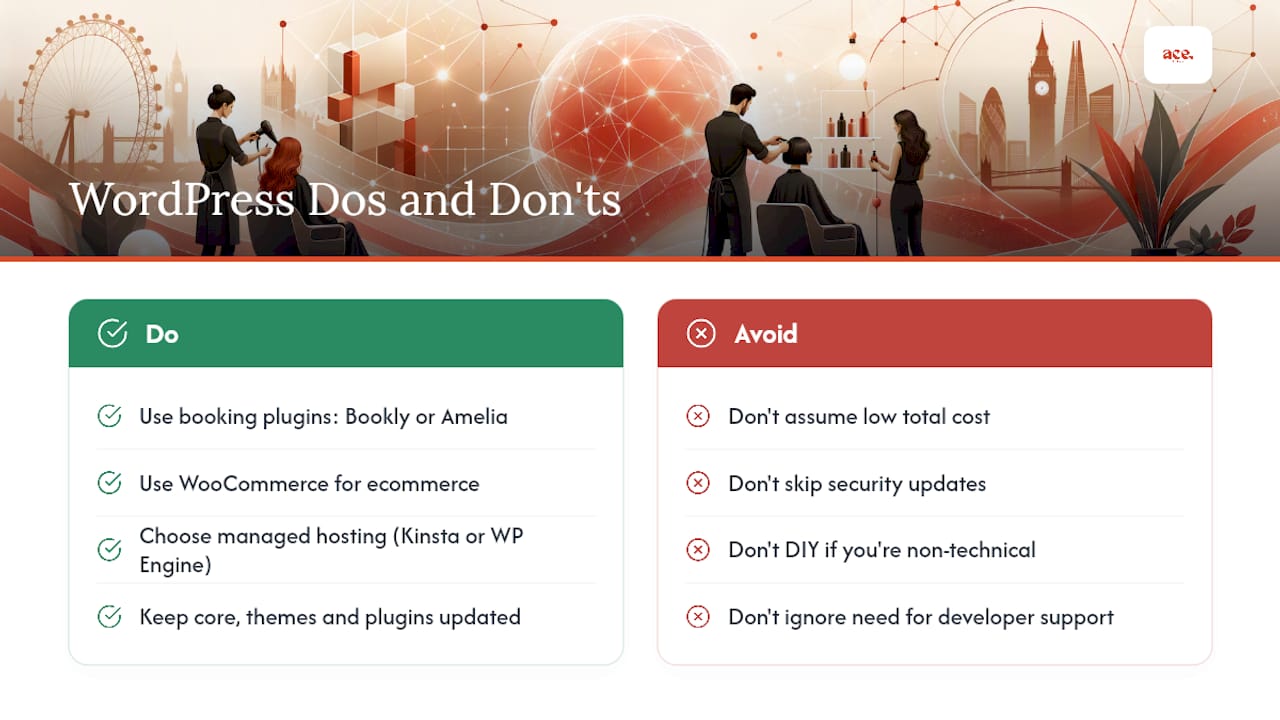
For booking, plugins like Bookly or Amelia handle appointments well and integrate with UK payment gateways. For ecommerce, WooCommerce is the standard choice. For SEO, plugins like Yoast SEO or Rank Math give you granular control over every page.
The practical challenge is maintenance. You are responsible for keeping WordPress core, themes, and plugins updated. Security vulnerabilities in outdated plugins are a real risk. Hosting costs start from around £5/month for basic shared hosting, but a reliable managed WordPress host costs more, and you may need a developer for setup and ongoing support.
Pro Tip: If you want WordPress's SEO power without the full technical overhead, look at managed WordPress hosting providers such as Kinsta or WP Engine. They handle updates and security, leaving you to focus on content and bookings.
Pros: Maximum flexibility, near-unlimited plugin options, full SEO control, strong content marketing capability.
Cons: Requires technical skill or developer budget, no central support, security and updates are your responsibility, total cost of ownership is higher than it first appears.
For salons considering the full range of small business website builder alternatives, the Ace-sites blog has a practical breakdown.
How do the top builders compare on features salons actually need?
Booking and scheduling
Native booking is the strongest signal of a builder's suitability for salons. Platforms with built-in scheduling (Ace-sites booking embeds, Wix Bookings, Squarespace Scheduling) keep clients on your site through the whole journey. Builders without native booking require a third-party embed, which adds a step and can introduce friction. Specialist booking platforms like GlossGenius bundle appointment management, POS, and website tools together, which reduces setup steps for salons that want everything in one place.
| Feature dimension | Managed SaaS (Ace-sites) | Drag-and-drop | Design-first | Commerce-first | Open-source |
|---|---|---|---|---|---|
| Native / embedded booking | Booking widget embed | Native booking module | Built-in scheduling | Third-party app required | Plugin required |
| Mobile performance | Mobile-optimised templates | Responsive; separate mobile editor | Fully responsive | Responsive | Depends on theme |
| Local SEO tools | Built-in SEO tools + blog | Good SEO settings | Solid SEO | Good product SEO | Near-unlimited control |
| UK payment gateways | Supported | Stripe, PayPal, Wix Payments | Stripe supported | Shopify Payments, Stripe | WooCommerce + plugins |
| Ecommerce depth | Service listings, gift vouchers | Moderate | Moderate | Comprehensive | Full via WooCommerce |
| Technical overhead | Very low | Low | Low | Moderate | High |
Templates and design
Design-first builders lead on template quality, but mobile performance matters more than visual polish for most salons. A template that loads slowly on a phone will cost you bookings regardless of how it looks on a desktop.
SEO and local SEO
Built-in SEO tools cover the basics for most salons: editable page titles, meta descriptions, SSL, and fast load times. For salons with a strong content marketing strategy, WordPress's plugin ecosystem offers more granular control. Some newer UK tools like Zolmi use AI-assisted content generation to speed up writing service descriptions, which can help with launch time.
UK payment gateways
Stripe and PayPal are the most widely supported gateways across all builder categories. Square Online is the natural choice if you already use Square for in-salon payments, as the POS and online store stay in sync automatically.
Pro Tip: Choose native booking over an embedded third-party scheduler wherever possible. Every extra click or redirect between "Book Now" and a confirmed appointment reduces conversion. If you must use a third-party tool, integrated booking workflows that keep the client experience on one page perform noticeably better than pop-up redirects.
How to get your salon website live in under a day
You can be live in under a day if you focus on a handful of tasks in the right order. Here is the checklist:
- Set up your Google Business Profile — claim or update your Google Business Profile listing and add your website URL. This is the single most impactful local SEO step you can take on day one.
Pro Tip: Keep your booking form short. Ask for name, contact number, service, and preferred time only. Every extra field you add reduces the number of people who complete the booking. You can collect additional details in the confirmation email or at the appointment itself.
A short UK compliance note: if you store client names, contact details, or appointment history, you are handling personal data under UK GDPR. Register with the ICO if required and make sure your privacy policy is visible on your site.
Some appointment apps include a bundled website option that activates from within the booking platform, which can cut setup time further for owners who are already using a scheduling tool.
Which marketing tools should your salon website connect to?
A salon website that cannot feed your marketing is a missed opportunity. The builders covered here vary significantly in how well they connect to the tools you are likely already using.
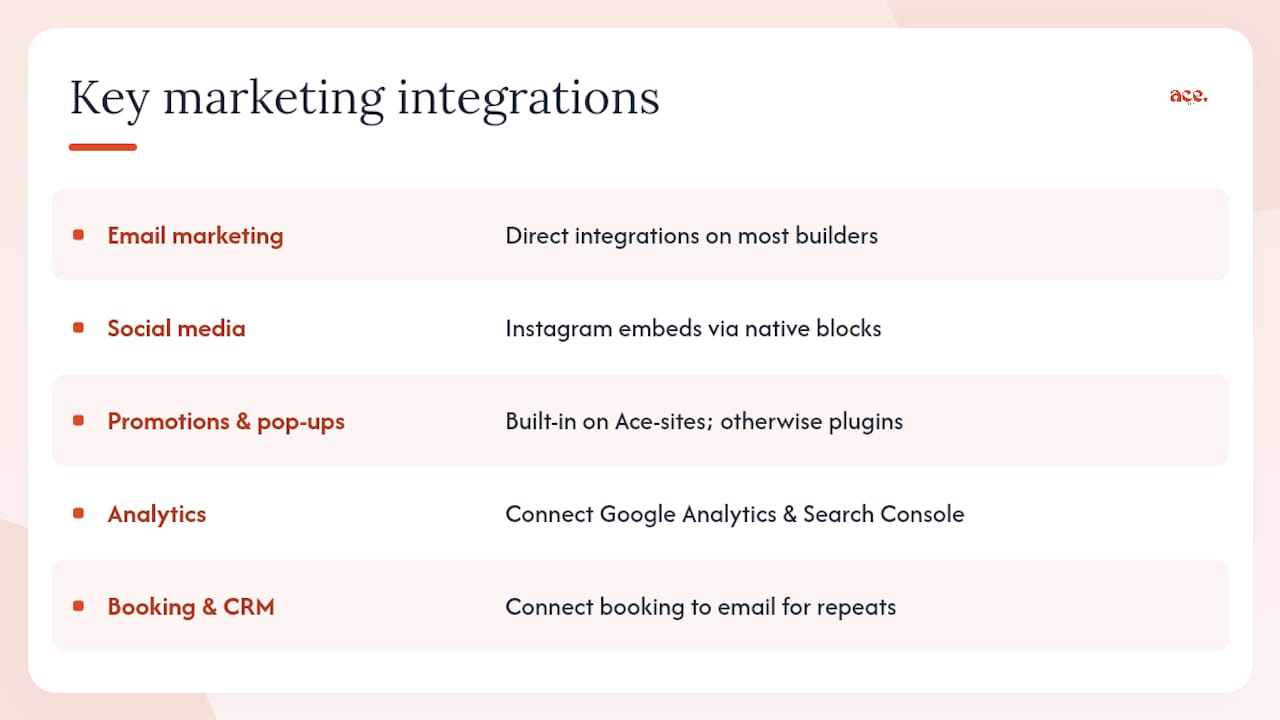
Email marketing is the most common integration salons need. Mailchimp, Klaviyo, and Brevo all offer direct integrations or embeddable sign-up forms that work across most builders. Collect email addresses at booking and use them for appointment reminders, seasonal promotions, and re-engagement campaigns for clients who have not visited in a while.
Social media connections let you pull Instagram feeds directly onto your site, which keeps your gallery fresh without manual uploads. Most builders support this via a simple embed or native block.
Promotions and pop-ups are where builders differ more noticeably. Ace-sites includes a built-in pop-up builder and announcement bar, which means you can run a flash promotion or highlight a new service without needing a separate tool. On platforms without these features, you would typically need a third-party app or plugin.
Google Analytics and Search Console should be connected from day one. Both are free, and together they tell you which pages clients visit, how they find you, and where they drop off before booking. Most builders make this straightforward via a settings panel where you paste your tracking code.
For salons thinking about integrated booking and client management workflows, connecting your booking tool to your email platform is the single step that most reliably turns a first-time visitor into a repeat client.
What do salons actually say about these builders?
Real-world feedback on salon website builders tends to cluster around a few consistent themes. Ease of setup and the quality of booking tools come up most often as the deciding factors, which aligns with what industry roundups consistently find.
Salons using drag-and-drop builders like Wix frequently praise the template variety and the speed of initial setup, but note that adding multiple premium apps (booking, email marketing, reviews) pushes the monthly cost higher than the headline plan price (amounts vary) suggests.
Squarespace users in the salon space tend to highlight the visual quality of their sites and the reliability of the scheduling tool, though some note that the platform feels less flexible when they want to make layout changes outside the template's structure.
WordPress users with developer support report strong satisfaction with SEO performance and long-term content strategy, but the recurring theme is that maintenance takes time or money. Salons without technical support often find the overhead grows over time.
Ace-sites clients, as shown on the portfolio page, highlight the speed of launch and the simplicity of ongoing edits as the main practical benefits. The optional done-for-you service is particularly noted by salon owners who wanted a professional result without learning a new platform. Independent review platforms like Trustpilot are a useful starting point for checking vendor reputations beyond the builders' own marketing.
For hair and barber businesses specifically, the Ace-sites guide to websites for hairdressers and barbers includes practical examples of how other salons have structured their sites and booking flows.
AI-powered site creation tools like DaySmart Salon offer a different route: an automatically populated site built from your existing booking data, which can get a basic presence live in minutes. The trade-off is less design control and a tighter dependency on that platform's ecosystem.
Key takeaways
For most UK salon owners, booking integration and mobile performance are the two features that most directly drive revenue from a website.
| Point | Details |
|---|---|
| Booking comes first | Choose a builder with native or embeddable booking before considering design or price. |
| Mobile performance matters most | Most salon searches happen on a phone; test every template on mobile before committing. |
| You can go live in under a day | Focus on template, booking, payment gateway, domain, and SSL in that order. |
| Match the builder to your business model | Commerce-first platforms suit retail-heavy salons; managed SaaS suits appointment-led ones. |
| Ace-sites for most UK salons | Ace-sites combines fast launch, booking embeds, built-in SEO, and optional done-for-you design on a transparent monthly subscription. |
The honest view on salon website builders
There is a tendency in builder comparisons to treat every option as roughly equal and let the reader decide. That is not particularly useful when you are a salon owner with a full appointment book and no spare hours to evaluate twelve platforms.
The reality is that most small UK salons do not need a commerce platform, a bespoke design marketplace, or an open-source CMS. They need a site that loads fast on mobile, takes bookings without friction, and shows up in local search results. The builders that do all three without requiring technical skill or a developer are the ones that actually get used.
The mistake I see most often is choosing a builder based on template aesthetics and then discovering the booking setup is clunky or the monthly cost doubles once you add the apps you actually need. Price the full setup, not just the headline plan. And always test the booking flow on a phone before you commit.
Ace-sites gets your salon online fast, without the agency price tag
There are other routes to a salon website: hire an agency, use a design marketplace like 99Designs, or build it yourself on a drag-and-drop platform. Each has its place. But if you want a professional, booking-ready site live quickly, without a large upfront cost or a long-term agency contract, Ace-sites is the practical alternative.
Here is what Ace-sites gives salon owners specifically:
- Built-in SEO tools — editable meta titles, a blog manager, and SSL as standard, so your site is set up to appear in local searches from day one.
Browse the Ace-sites portfolio to see completed sites for local businesses, then get started on your salon site today.
Sources and where to read more
- 6 Best Website Builders for Beauty Salons in 2026
- Salon Website Builder: Wix vs Squarespace vs WordPress | LBH
- Custom Booking Website Builder | GlossGenius
- Salon Website Builder with Online Booking | DaySmart Salon
- AI Website Builder | Create Your Intelligent Salon & Spa Website | Zolmi
- Free Salon Website
- trustpilot.com
- blog.hubspot.com
- aceSites Features | Everything Your Business Website Needs | aceSites
- Real Business Websites Built on aceSites | Portfolio | aceSites